The Printer Filter
All output explicitly sent to the printer device :PRT.0 goes via the ‘Printer Filter’. This filter examines every character to see if it has some special meaning or if it is to be translated into another character or sequence of characters. The code translation and command codes may be edited using the ‘Printer Editor’ (□E) as described in your Z88 Users’ Guide.
Most printers have a set of control codes that switch the printer into similar modes. However, whilst most printers provide a number of similar modes, the codes used are often different. The ‘Printer Filter’ provides a universal set of print format controls which may be used irrespective of the printer in use. Provided you use the ‘Printer Editor’ (□E) to configure the Print Filter for your printer, your programs will work in exactly the same way irrespective of the printer in use.
The ‘Printer Filter On’ and ‘Printer Filter Off’ Escape sequences also turn the printing on and off. So remember to use them before and after printing.
The tables in the following sub-sections include program segments that will send the appropriate codes to the printer file. These assume that the printer file handle is in the variable `pf’ and that ENQ$ is CHR$(5).
Printer Control Codes
Escape Sequence | Meaning Printer ON. Printer OFF. Set page length to ‘n’ lines. Microspace ‘n’ units of 1/120 inch. Reset attributes that would be reset by a new-line. Send the hex values ‘x’ and ‘y’ to the printer. |
Attributes
The following codes toggle printer attributes such as bold print, underline, etc. These toggles can be automatically reset at the next carriage-return by setting the ‘Off at CR’ option in the Printer Editor to ‘Yes’. By default, all the attribute toggles with the exception of ‘Alternate Font’ (`A’) and ‘User Defined’ (`E’) are automatically reset when a carriage-return is sent.
Escape Sequence | Meaning Underline Bold Extended sequence Italics Subscript Superscript |
Escape Sequence | Meaning Alternate font User defined |
Unless you have used the Printer Editor to set ‘Off at CR’ to ‘No’, you should use the `BPUT#’ version of the commands. If you use the ‘PRINT#’ version of the commands, the terminating CR will undo its effect (excepting Printer On/Off and Alternate and User Defined fonts).
Unlike the screen control codes, the printer control codes cannot be strung together or explicitly set by preceding them with a ’+’ or ‘-’. Neither is there a ‘reset all toggles’ command.
Untrapped Characters
The following control characters are not treated as commands by the Print Filter. Like the normal printable characters (Space to Delete &20 to &7F) they may be translated, but they are otherwise sent directly to the printer.
| Name | Hex Value |
|---|---|
| NUL | &00 |
| BEL | &07 |
| BS | &08 |
| HT | &09 |
| LF | &10 |
| VT | &OB |
| FF | &OC |
| CR | &OD |
Printer Redirection
The ‘Operating System Interface’ section of the manual describes how input and output may be redirected. The diagram below may help you to visualise how and where redirection takes place. It also illustrates how the Printer Editor and the PANEL affect the output.
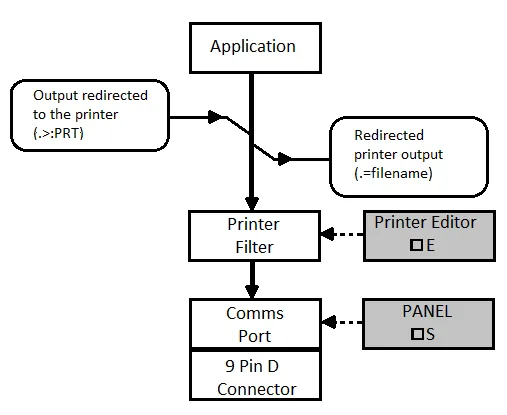
Since you cannot issue CLI ‘dot’ commands from the keyboard, you will need to write a CLI command file using PipeDream in order to redirect the printer input or output. The CLI command file shown below would redirect printer output to a file called `pfile’.
.=pfile
.S
If this file had been saved (in ‘plain text’ format) as ‘predif, you could initiate printer output redirection by issuing the command
◇ EXpredirfrom the filer (□F), or
*CLI .*predirin the immediate mode from within BBCBASIC(Z80).
If you wished to issue the command from within a BBCBASIC(Z80) program, you would need the following program line.
OSCLI("CLI .*predir"):x=INKEY(0)See the ‘Operating System Interface’ section of the manual for an explanation of CLI command files.