Exporting your program
When your program is ready to run outside the IDE, on real hardware or in another emulator, export it. Klive compiles the build root and writes a file in a format the machine can load: a tape, a ZX80/ZX81 program file, a bootable disk, a Microdrive cartridge or a NEX file. For a ZX Spectrum tape or disk, Klive can add a BASIC loader that loads and starts your code.
This page is about exporting the compiled program. To turn a disassembly into source code, see Exporting a disassembly as source.
Export with the dialog
Open the Export Code dialog
Choose Build › Export code…. (The menu item runs the exportCode function of build.ksx; see
The build system.)
Choose the format
Pick the Export format. The list depends on the machine the project runs on; see Formats by machine.
Name the file
Type the Export file name. Without an extension, Klive adds the format’s. Export folder is
optional: without it, the file goes into the KliveExports folder of your home folder.
Program name is the name in the tape header; when it is empty, Klive uses the file name.
Set the loader options
For a tape or disk, leave Create BASIC loader ticked to get a loader that loads and starts your code, and set its options (see The BASIC loader).
Export
Click Export. Klive compiles the program first; if the compile fails, nothing is exported and the errors are in the Build output.
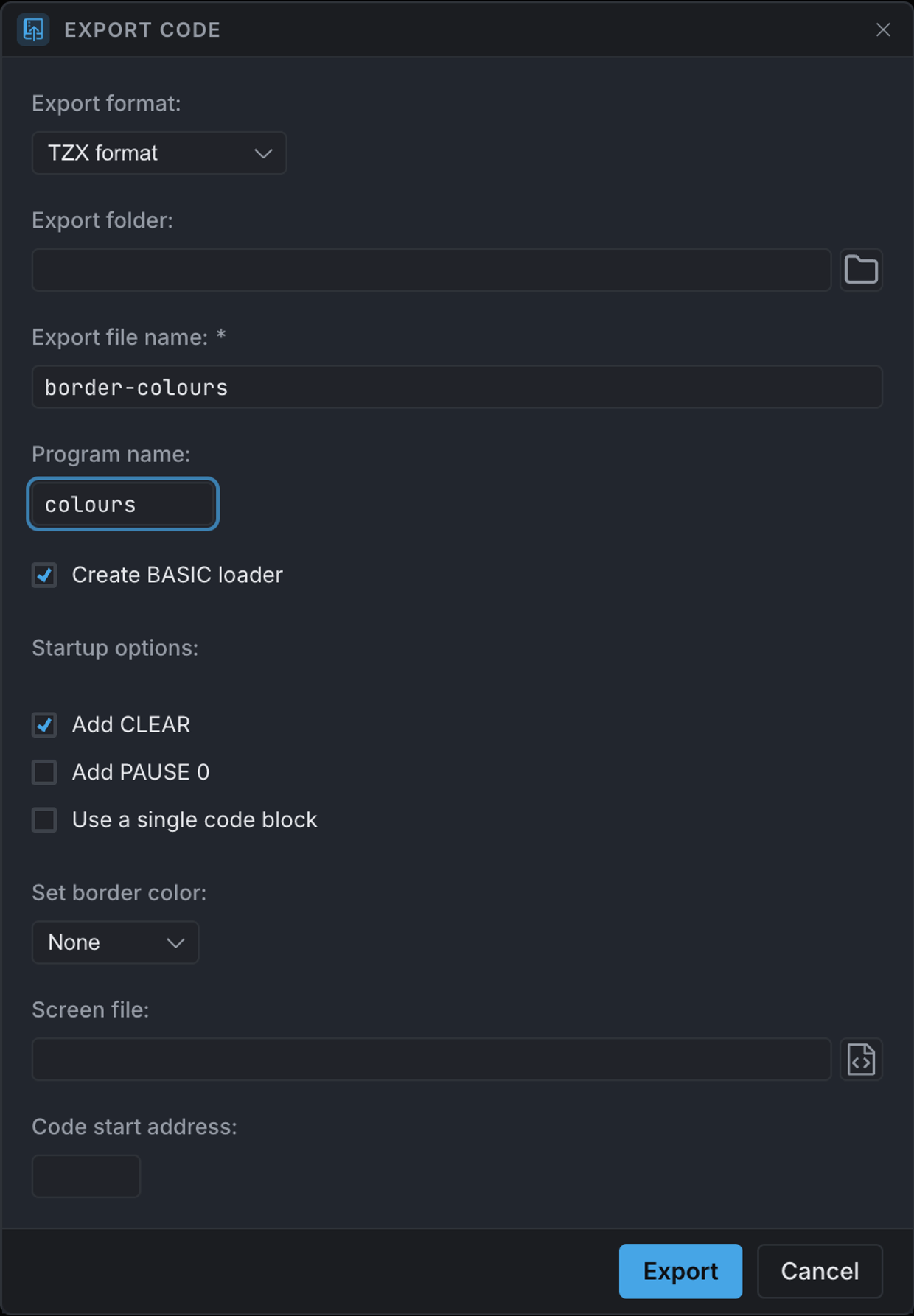
The dialog remembers its values for the next export.
Formats by machine
| Machine | Formats in the dialog |
|---|---|
| ZX Spectrum 48K | TAP format, TZX format, Intel HEX format, Microdrive cartridge (.mdr), booted by RUN |
| ZX Spectrum 128K (and the Pentagon 128) | TAP, TZX, Intel HEX, TR-DOS disk (.trd), booted by TR-DOS, Microdrive cartridge |
| ZX Spectrum +2E/+3E (and the +2A/+3) | TAP, TZX, Intel HEX, +3 disk (.dsk), booted by the Loader |
| Scorpion ZS-256 | TAP, TZX, Intel HEX, TR-DOS disk |
| Timex, ZX Spectrum Next | TAP, TZX, Intel HEX |
| ZX81 | ZX81 program (.p), Intel HEX |
| ZX80 | ZX80 program (.o), ZX81 program (for a ZX80 with the 8K ROM), Intel HEX |
| HT-1080Z | HT-1080Z program (.cmd), HT-1080Z tape (.cas), Intel HEX |
- TAP and TZX are ZX Spectrum tape files. Intel HEX is a text file of the raw bytes, for EPROM programmers and other tools; it has no loader.
- A .dsk, .trd or .mdr export is a bootable image: the +3’s Loader, TR-DOS or
RUNon an Interface 1 starts the program. Working with disks and Microdrives show them at work. - A .p or .o file holds the program as a BASIC program with the code in a
1 REMline. On a ZX81 program, the checkbox reads Run the program when loaded. A ZX80 program has no such option. See ZX81 and ZX80. - An HT-1080Z .cmd loads with
SYSTEMand carries its start address; a .cas is aSYSTEMtape. See HT-1080Z.
ZX Spectrum Next: NEX files
A ZX Spectrum Next program written with .model next exports as a .nex file. Run and Debug already
build one and have NextZXOS load it. To write one yourself, use the .savenex pragma in your source
or the expc command with -f nex, for example expc "game.nex" -f nex. See
NEX files and ZX Spectrum Next development.
A ZX BASIC program exported as a NEX file also gets a
<name>.nex.kbasic-debug.json file beside it, so nex-run <file> -d can debug it at source level.
C programs (z88dk)
For a project whose build root is a .c file, Export copies the file z88dk itself wrote for the
format (.tap, .dsk, .p, .o, or .epr on the Cambridge Z88), so you get exactly what z88dk
built. The BASIC loader options do not apply and are ignored with a warning. Intel HEX still comes
from Klive. See z88dk (C).
The BASIC loader
With Create BASIC loader ticked, a ZX Spectrum export starts with a BASIC program that loads the
rest of the file in the right order and to the right addresses, then starts your code. On the 128K
and later models, code compiled into several banks (with the .bank pragma) is loaded into its
banks. A ZX BASIC program that banks its modules on the 128K ('@split-modules) is the exception:
its TAP or TZX export is zxbc’s own tape, with zxbc’s own loader, and the options below do not
apply to it (Modules and banked code).
The options:
| Option | What it does |
|---|---|
| Add CLEAR | Adds a CLEAR statement to the loader, so BASIC keeps out of the code’s memory. |
| Add PAUSE 0 | Waits for a key press after loading, before starting the code. |
| Use a single code block | Saves all code segments (one per .org) as one block, the gaps filled with zeros. Otherwise each segment is a block of its own. |
| Set border color | The border colour while the code loads; None leaves it alone. |
| Screen file | A loading screen: a .tap or .tzx with a SCREEN$ block, a 6912-byte .scr file, or a 7040-byte .scr with a +3DOS header (the header is skipped). |
| Code start address | Where the code starts, as a decimal number between 16384 and 65535. Leave it empty to use the program’s entry point (from .org, .xorg, .ent or .xent). |
Without a loader, the export holds only the code blocks, for your own loader to load.
To look at a loader, turn off fast loading in the emulator, load the exported file, pause the machine after the first block and open View › Machine Views › BASIC Listing (BASIC listing).
Export from the command prompt
The dialog builds an expc command and runs it. You can type the same
command at the command prompt or call it from a build function:
expc filename [-n name] [-f tap|tzx|hex|nex|dsk|trd|mdr|p|o|cmd|cas|epr] [-as] [-p] [-c] [-b border] [-sb] [-addr address] [-scr screenfile]-as adds the BASIC loader (on a ZX81 program: run when loaded), -p adds PAUSE 0, -c adds
CLEAR, -b sets the border colour (0-7), -sb makes a single code block, -addr sets the start
address and -scr adds a loading screen.
Exporting over the inserted tape
When you export over the tape file that is inserted in the machine, the machine keeps playing the old contents until you rewind the tape with Machine › Tape › Rewind.