Keyboard Control
You can echo characters which are sent to the screen to the printer. Printer echo is controlled with the following key sequences.
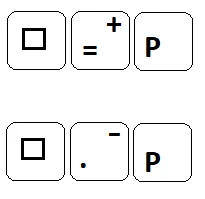 | Printer echo on. All subsequent characters sent to the screen are echoed to the printer. Printer echo off. |
This is not quite as straightforward as it at first appears. In fact, □+P starts a CLI command that sends a copy of characters sent to the screen to the printer as well. The key sequence □-P removes that CLI command.
Whilst the CLI command is active, the ‘CLI’ indicator appears in the OZ window and page-waits do not occur during a program listing.

In addition to □-P, you can cancel the □+P CLI command in the normal way by pressing the SHIFT/ESC or ◇ESC.
Using printer echo is an easy way of listing a program on the printer. In the following example, the ‘+’ represents the `=/+’ key; you don’t have to use the SHIFT key.
LIST □ +P ENTER……….
Program listed to screen and printer.
……….
□-P