Annotating a Disassembly
A disassembly becomes readable once its addresses have names, its routines have comments and its data is listed as data. Klive keeps these annotations in a file beside the program, shows them in the Disassembly view and everywhere else an address appears, and can export the annotated program as source. This page covers adding annotations, where they are kept, data regions, and the annotations Klive ships for the machines’ ROMs.
Annotations on every machine
Annotated rows carry names, synopsis comments above them and end-of-line comments beside them, and
ranges marked as data list as data. The annotations are kept
in a file beside the program they describe (game.nex.dis, jetpac.z80.dis, game.p.dis),
and the one in use is the active annotation set. It is chosen for you when a program gets
into the machine:
nex-runuses the.NEXfile’s annotations;zx-snapshotuses<snapshot>.dis;tape-loadof a ZX80 or ZX81 program file uses<file>.dis;- opening a project uses
annotations.disin the project folder (or the file the project’sannotationssetting names).
The file does not have to exist: your first label or comment creates it. For anything else (a
game loaded from a Spectrum tape, say), use ann-new or
ann-open; ann-info says which set
is active.
Annotating a row
Open the listing
Open the Disassembly view while the machine is paused, or pop a bank out of a NEX file.
Right-click the row
The row menu offers the annotations below. A region’s dialog lets you set where the range starts and ends.
Fill in the dialog
Labels, comments and regions each have a dialog with a preview of the result. The first annotation creates the annotation file if it does not exist yet.
On a ROM row the entries edit the ROM’s working copy (see
Editing a ROM’s annotations). The row menu’s entries are Label…, Synopsis Comment…, End-of-Line Comment…,
Operand Label…, Mark As Code / Bytes / Words / Text / Skip, Mark As Fill (.fillb) (runs of
one repeated byte, such as padding, listed as .fillb 1170,$FF), Mark As Bit-7 Text (.defc) (every
machine but the ZX80 and ZX81: strings whose last character has bit 7 set, listed as .defc "TEXT"),
Mark As Copper and Mark As DMA (on the ZX Spectrum Next), Go to Definition, and Go to References. The same keys as in a popped-out .NEX bank work on
the row you last clicked (L for a label, C for an end-of-line comment, Shift+C for a synopsis,
Shift+F12 for references). The label goes in
the bank the row is in (it follows that bank wherever it is paged), and the
label command does the same from the command prompt.
Labels and references
Go to References lists the rows that name a label: one entry for the row’s own label and one for
each label its operands name (KEY_LEFT: call AT_LINE_START offers both). The list shows each row’s
address, its instruction (a .defw row of a jump table counts too) and the label above it: the
routine or table it sits in. Go To closes the list and scrolls there. Only the bank or ROM page
the row is in is searched. The Refs column of the Labels list counts the same rows, so a label
showing 3 there lists 3 here.
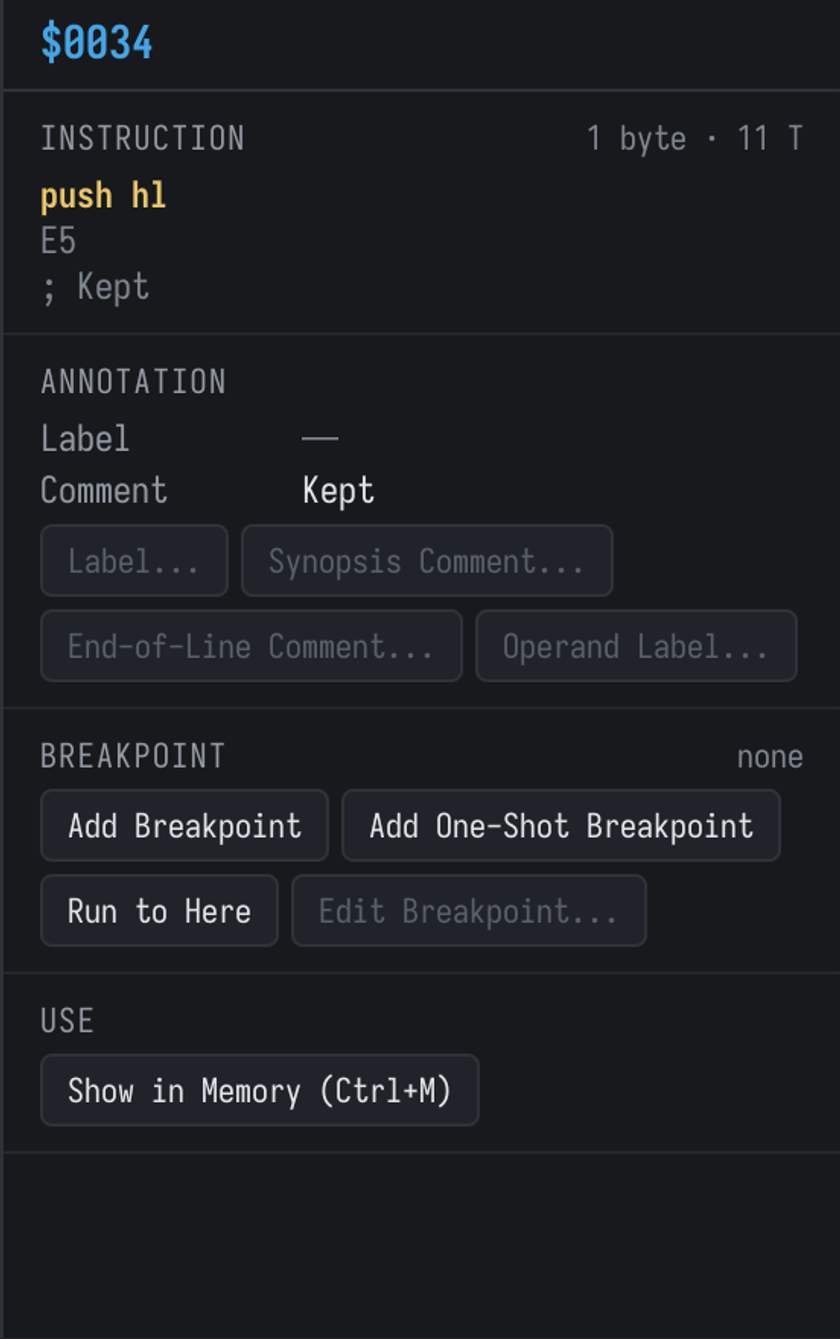
The live Disassembly view shows the count after each label (◂ 3); click it, and its inspector
lists the rows. The inspector also offers the row’s annotation entries (Label…,
End-of-Line Comment… and the others) beside its label and comment, so a row can be annotated
without its menu; an edit is saved at once, as from the menu.
A row shows one name. Where the address has several (a label from your last build, one from
the annotations, one from the ROM’s), the build’s wins, and the label’s tooltip names where it
came from and lists the others. The same names appear in the Execution History, the Call Stack
(MAIN+12: the routine a return address is in), the Profiler’s routines and the dis command.
On the ZX80 and ZX81, memory appears at more than one address (the 16K RAM again at $8000 and
$C000, the ROM again at $2000). A label is kept for the byte, not the address, so it shows at every
mirror, and a mirror row says (mirror of $4082).
Data regions
Mark As Bytes, Mark As Words, Mark As Text and the other region entries tell the listing
that a range is data, so it lists .defb, .defw or .defm rows instead of nonsense instructions.
Mark As Skip hides a range (the Spectrum’s screen memory, say). To find data without marking it
by hand, run Detecting code and data on a program you have
run with coverage on.
Byte formats
When you mark a range as Bytes, the region dialog also asks how to write it:
- 4 bytes, hex (the default):
.defb $3C, $42, $81, $FF - 2 bytes, hex: two values to a row
- 1 byte, hex: one value to a row
- 1 byte, binary: one value to a row with all eight bits,
.defb %00111100; handy for bitmaps, masks and flag tables
The dialog opens on the format the range already has, and the Manage Regions list shows any format other than the default beside the type. Binary rows stay binary when you switch the listing to decimal, and they export to source that the Klive assembler reads back.
Copper lists and DMA programs
On the ZX Spectrum Next, the row menu (Mark As Copper, Mark As DMA) and the region dialogs
offer two kinds of region for the Next’s hardware programs, in the live Disassembly view and in a
popped-out .NEX bank alike:
- Copper lists the range as a Copper list, one
.copperinstruction per two-byte word, with what each instruction does in the comment column. The range must have an even number of bytes. - DMA lists the range as a zxnDMA program (the bytes a program sends to port
$6B), one.dmacommand per row.
The rows use the same .copper and
.dma pragmas the assembler accepts, and every row assembles back to the
exact bytes it shows:
    .copper wait 96, 3              ; line 96 · x 24
    .copper move $41, $E0           ; Palette Value (8 bit) ← $E0
    .copper halt                    ; halt until the next restart
    .dma reset                      ; WR6: reset
    .dma wr0 a_to_b, transfer, $4000, $0020
    .dma wr4 continuous, $4800      ; WR4: continuous mode, port B $4800
A DMA range is read the way the DMA reads it: the bits of each command byte decide how many bytes
follow. A command the pragma cannot spell is shown as .dma cmd or .defb, with its meaning in the
comment, and a command cut off by the end of the range says how many bytes it still expects. A label
on an address or a length inside a command splits it into the
runtime-patching form, with the labelled field
as a .defw row of its own.
$00 is a valid DMA command, so a range that runs into zero-filled memory lists many
.dma wr2 memory, decrement rows. When a DMA range ends in a long run of zeros, the region dialogs
offer to trim it.
The annotation file stores both kinds as byte regions with a decode key, so an older Klive opens the
file and shows these ranges as plain .defb rows.
ROM annotations
Calls into the ROM read by name: call SA_BYTES rather than call $04C2. Klive ships annotations
for its ROMs, written for Klive, and finds them by the ROM’s bytes rather than by which ROM slot is
paged: a copy of the 48K ROM loaded from your own file gets them too, and on a ROM Klive does not know
(a modified 48K ROM, say) they apply wherever its bytes still match. ROM labels are set in italics so
your own stand out.
The 48K ROM’s annotations are complete (completeness level 2): every call and jump target has a
label, every labelled routine has a synopsis saying what it does, takes and returns, and the lines
whose purpose is not obvious carry a comment. The 128K’s ROM 1 is complete too: it takes the 48K
ROM’s annotations wherever its bytes match and adds its own for the routines the 128K changed and
the code it added. The 128K’s editor ROM (ROM 0) is complete as well: its menus, the full-screen
editor, the RAM disk, PLAY, the RS232 and tape commands are all labelled, described and commented.
So are the 48K BASIC ROMs (ROM 3) of the +2A and +3, in the v4.0, v4.1 and Spanish versions (the +3E
shares v4.0’s): they take the 128K’s annotations where their bytes match and describe what Amstrad
changed, such as the disk motor’s time-out and the Spanish messages. The +3’s disk operating
system ROM (ROM 2, +3DOS) is complete too, in the same three versions: its jump table, the files and
directory, the sector cache, the floppy controller driver and the built-in disk test. The +2E and
+3E share v4.0’s ROM 3, and their ROM 2 is annotated as well, including its hard disk driver,
partitions and drive letters. The +3’s editor ROM (ROM 0) and syntax ROM (ROM 1) are complete in all four
versions (v4.0, v4.1, Spanish and +3E), the +3E’s with its window, memory and file channels and
its commands for partitions and streams. The ZX Spectrum Next’s ROMs are complete as well: the four
pages of NextZXOS (the system ROM with its start-up menu, Browser and window channels; NextBASIC’s
command ROM; the DOS ROM with its IDEDOS and +3DOS-style jump tables and the SD card driver; and the
48K BASIC page NextZXOS extends), the alternate ROM with NextBASIC’s editor and its graphics, sound
and file commands, the DivMMC ROM’s file system and the Multiface ROM’s NMI menu; the enNextLG.rom
variant shares them. In these ROMs the disassembly lists the address after each call into another
ROM as a .defw, and the error code after each error call as a .defb. The other ROMs’ annotations
are still sparse.
Use bp-set ROM:<name> to break at a ROM label, and ROM:<name> in a breakpoint condition.
Editing a ROM’s annotations
A ROM’s annotations are edited in a working copy, never in the shipped file. Make one with
rom-ann-new, or with Start Editing ROM Annotations… on a
ROM row’s context menu:
rom-ann-new sp48.romFor a ROM Klive ships, the working copy is an exact copy of its shipped annotations, kept in Klive’s
home folder as RomAnnotations/sp48.rom.dis, where it survives an update. For your own ROM file it is
<file>.dis beside it. Once it exists, it replaces the shipped annotations for that ROM: you can
rename, change or remove any shipped label, comment or region, and only the working copy is shown.
Without a working copy, the shipped annotations are shown and a ROM row cannot be edited.
Opening a working copy (from Open ROM Annotations on a ROM row, from Debug › ROM
Annotations (pick the machine type, then the ROM file), with
rom-ann-open, or by opening the .rom.dis file) shows
the ROM annotation editor. It finds the ROM by its bytes and shows two panes: on the left,
everything about the file; on the right, its pages, one row each with the ROM’s name and CRC, its
size, its labels, how many targets still need one (To label) and its completeness level. Every
page of the ROM file is listed; a page not annotated yet says so, and opening it adds it to the
working copy. The row’s disassembly icon opens a page with everything a NEX bank has: select rows, right-click for the annotation menu, or use the
shortcuts (L label, C end-of-line comment, Shift+C synopsis, O operand label, M/R manage
labels/regions, B bank comment). No machine needs to be running. If no ROM matches the file, the
editor says so and shows nothing else. With a working copy in place, ROM rows of the live view are
editable too, and every edit shows wherever ROM names appear.
A shipped annotation file opens Read-only; Make working copy copies it to your own folder
and opens the copy to edit. The editor’s Ready chip says whether the file passes every check a
shipped annotation file must pass (the same as
rom-ann-check). New entries are recorded as chooses
whether what you add is observed (worked out from the bytes) or manual (an interface fact from a
manual); rom-ann-provenance changes an existing entry.
To label is the to-do list of completeness level 1, which needs a label on every CALL, JP,
RST, JR and DJNZ target reached from code. It counts the targets that still have none, and its
next $xxxx link opens the disassembly at the next one; each click moves on to the following
target. A page with none left shows none.
Rest the pointer on a completeness level (the Ready chip, records level, the Completeness column head or a page’s level meter) and a card explains the three levels, marks the ones reached and the next one, and counts what is still missing: the targets without a label and the labels without a synopsis.
Export as source… writes the whole ROM as one Klive Z80 assembly file, with your labels and
comments, then assembles it and says whether it gives back the ROM byte for byte (the same as
rom-ann-export). Open opens the file it wrote.
A working copy is written in exactly the format of Klive’s own ROM annotation files. When it is
ready, it can be copied into src/public/roms/ of a Klive checkout unchanged.