How Klive handles projects
Klive opens any folder, but it builds, runs and debugs the code of a Klive project. This page explains the difference, and what Klive does when you open a folder you made with another tool.
A folder and a project
A Klive project is a folder with a klive.project file in it. Any other folder is a plain folder. Klive opens both: the Explorer shows their files, and you can open and edit them.
In the Explorer, a home icon in front of the root folder’s name means the folder is a Klive project.
What a project adds
| Plain folder | Klive project | |
|---|---|---|
| Browse and edit the files | Yes | Yes |
| Use the emulator, load tapes and snapshots | Yes | Yes |
| A build root, and Compile, Run and Debug from the build bar | No | Yes |
| The Build menu | No | Yes |
| The machine and model, restored when you open the folder | No | Yes |
| Breakpoints, watches and open documents, kept between sessions | No | Yes |
| Exclude in the Explorer, and unit tests | No | Yes |
The build root is the main source file, the one Klive compiles.
Create a project
Choose File › New Project…, pick a machine, a model and a template, and name the project. Klive creates a folder with a klive.project file, a build.ksx build script and a small program to start from. The next page, Your first assembly program, walks you through it.
Open a folder from another tool
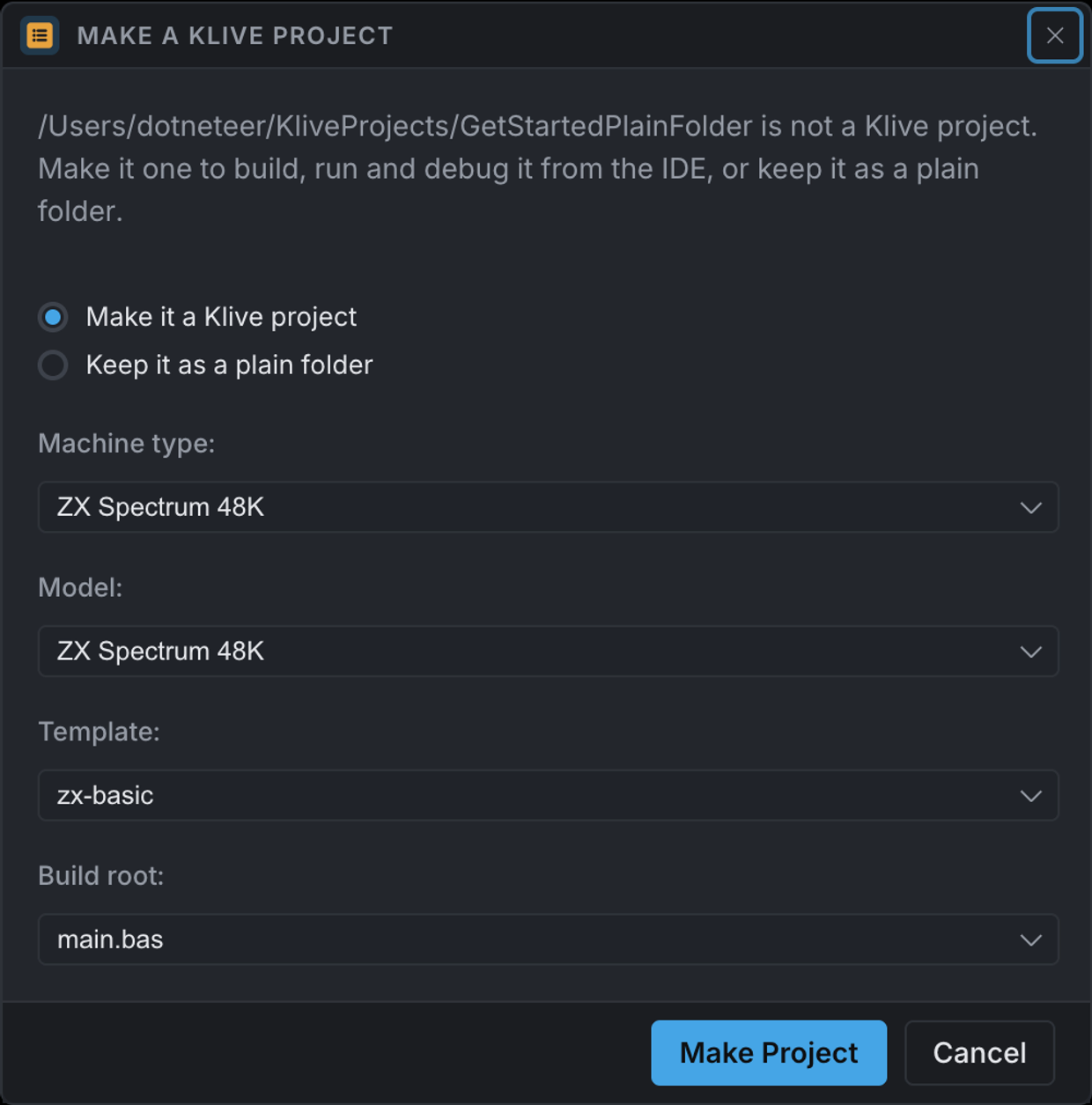
When you open a folder that has no klive.project file with File › Open Folder…, File › Open Recent or the open command, Klive asks what to do with it. It asks too when it reopens such a folder at startup, because it was the last one you had open:
 123
- Make it a Klive project, or Keep it as a plain folder.
- Template: Klive copies the template’s files into the folder: the
build.ksxthat Compile, Run and Debug need, and a sample program. For a folder with BASIC files, Klive picks thezx-basictemplate, and otherwise the machine’sdefaulttemplate. - Build root: the file Klive builds. Klive lists the folder’s source files and picks one of them. You can choose The template’s build root, the sample program, instead.
Choose the Machine type and the Model too: the dialog starts on the machine that is running. Then click Make Project. Klive writes the files, reopens the folder as a Klive project and opens the build root.
When a file of the template already exists in the folder, the dialog lists it with a checkbox. Klive replaces only the files you tick; the others stay as they are.
To leave the folder as it is, choose Keep it as a plain folder and click Keep Folder: Klive remembers the choice and does not ask again for that folder. Creating a project says where Klive keeps it and how to undo it. Cancel leaves the folder plain too, but Klive asks again the next time you open it.
To make a plain folder a Klive project later, choose File › Make Klive Project…, or right-click the root folder in the Explorer and choose Make Klive Project….
Klive changes a plain folder only when you ask it to. Opening the folder and editing its files writes no klive.project file into it.
The files Klive maintains
klive.projectstores the project’s machine and model, its build root, breakpoints, watches, project settings and IDE state. Klive updates it while you work, so do not edit it while the project is open.build.ksxholds the functions behind Compile, Run and Debug, and the Build menu. It is yours to change: see The build system.
Read more in Creating a project and Project templates.
Next, write your first assembly program.