Machine-State Panels
While the machine is paused, the side-bar panels of the Debug and Machine info activities show what is inside it: the CPU’s registers, the state of the ULA and the keyboard, the system variables, and the machine’s other chips. Each machine shows only the panels it has hardware for. Click a panel’s title to open or close it, and hover a value for its name and its value in other number bases.
| Activity | Panel | Machines |
|---|---|---|
| Debug | Z80 CPU | every Z80 machine |
| Debug | ULA & I/O | the ZX Spectrum family |
| Debug | BLINK | Cambridge Z88 |
| Machine info | System Variables | ZX Spectrum 48K, 128K, +2A/+3, Next; ZX81; ZX80 |
| Machine info | PSG (AY-3-8912) | ZX Spectrum 128K, +2A/+3, Timex, Scorpion, HT-1080Z |
| Machine info | NEC UPD 765 Log | models with floppy disk drives |
On the ZX Spectrum Next, the Machine info activity adds Next Palettes, Next Memory Mapping, Copper and Interrupts, described in Next registers, memory mapping and palettes, The Copper view and Debugging interrupts.
Z80 CPU
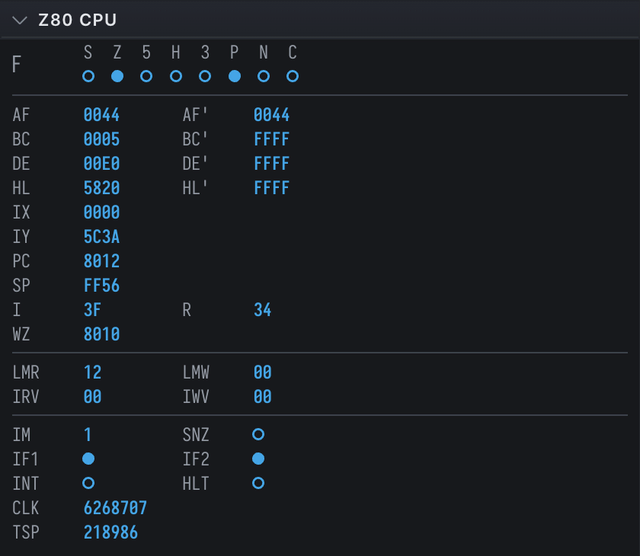
From the top:
- The F row: the eight flags of the F register, one column each:
S(sign),Z(zero),5(bit 5),H(half carry),3(bit 3),P(parity/overflow),N(subtract) andC(carry). - The registers:
AF,BC,DE,HLand their shadow setAF'toHL',IX,IY,PC,SP,I,R, andWZ, the CPU’s internal register often calledMEMPTR. Hover a register pair for its two halves. LMRandLMW: the last value read from and written to memory.IRVandIWV: the last value read from and written to an I/O port.IM: the interrupt mode.SNZ: whether the CPU is snoozed (the Cambridge Z88 uses this mode).IF1andIF2: the two interrupt flip-flops (IFF1 and IFF2).INT: whether the interrupt signal is active.HLT: whether the CPU is halted.CLK: the T-states since the machine started.TSP: the T-states since the machine last started after a pause, which is how you measure the cost of a piece of code.
In the execution history. When you step back, a band at the top of the panel says where you
are: History · step and the step number, the frame, and a Present link that returns to the
live machine. It also says when the routine was entered by an interrupt or an NMI. Registers the
instruction just before this point changed are marked, and their tooltips add the present value
(Now:). Values a history record does not hold (CLK, TSP, the last accesses) are
left blank rather than showing the present’s. With reverse debugging off, the band adds memory
shows the present. See The execution history.
ULA & I/O
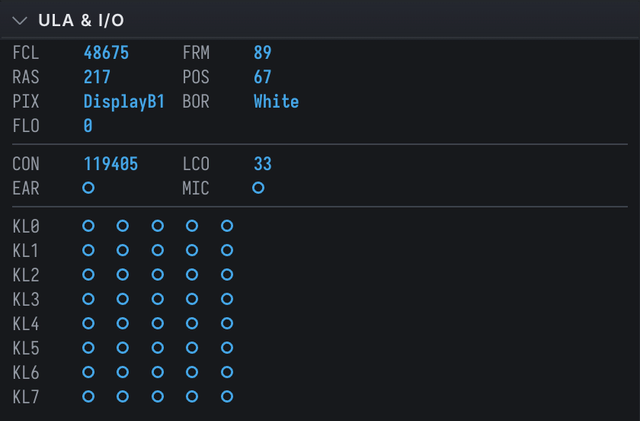
FCL: the frame clock, the T-state within the current frame (a 48K frame is 69,888 T-states, borders and blanking included).FRM: the frames rendered since the machine started.RASandPOS: the raster line being drawn and the position within it (in T-states; on the ZX Spectrum Next in 7 MHzHCunits). The paused screen shows the same position on the picture.PIX: what the ULA is doing at this tact:None(a blank, invisible area),Border, or one of the display steps, which show pixels from one byte while fetching the next byte or attribute (DisplayB1FetchB2,BorderFetchAttrand so on).BOR: the border colour.FLO: the floating bus value, which a read of an unhandled port returns at this moment.CON: the T-states the CPU lost to memory contention since the machine started.LCO: the same since the last pause.EARandMIC: the two I/O bits of port$FE.ROMPandRAMB(ZX Spectrum 128K): the ROM page and the RAM bank paged in.
The keyboard lines
KL0 to KL7 are the eight half-rows of the keyboard, five keys each, a filled mark for a key
that is down. Hover a mark for its key; click it to press or release that key, which is handy
for driving a program from the debugger. From left to right:
| Line | Keys |
|---|---|
KL0 | V C X Z Caps Shift |
KL1 | G F D S A |
KL2 | T R E W Q |
KL3 | 5 4 3 2 1 |
KL4 | 6 7 8 9 0 |
KL5 | Y U I O P |
KL6 | H J K L Enter |
KL7 | B N M Symbol Shift Space |
System Variables
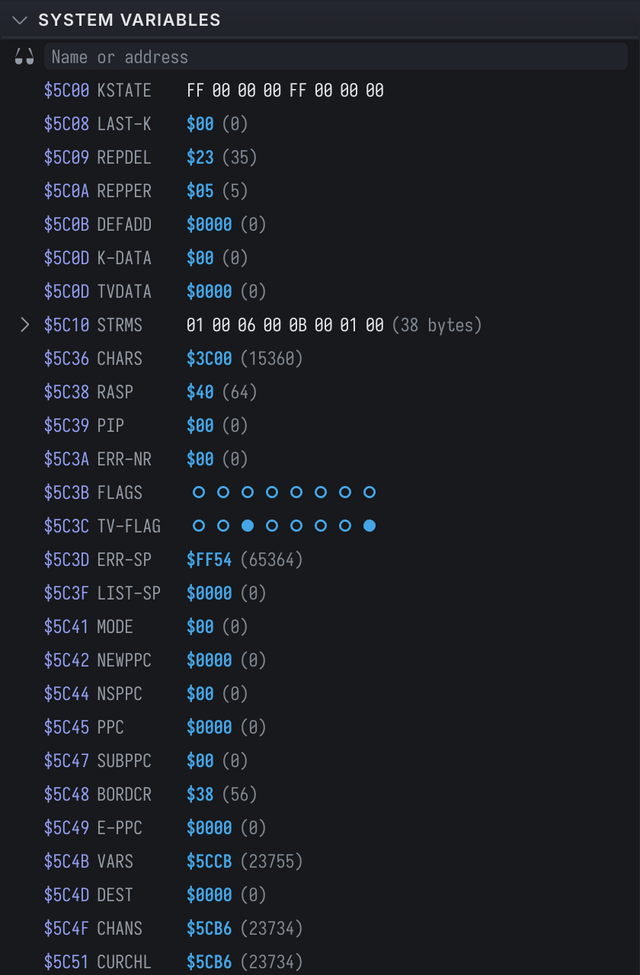
The System Variables panel of the Machine info activity lists the ROM’s system variables
with their address, name and value. Type a name or an address in the filter box to narrow the list.
A value that changed since the last refresh is highlighted. Long arrays (such as the 128K’s
TSTACK) are collapsed to one row; click the chevron to see all their bytes.
Hover a name for its description and its address, size and kind; hover a bit of a flags variable for that bit’s meaning. The values cannot be edited here: use the Memory view.
The same names appear in the Disassembly view.
Other chips
- PSG (AY-3-8912): the sound chip’s registers: for each of the channels A, B and C the tone period, whether tone and noise are enabled, the volume and the envelope switch, and the shared envelope and noise generators.
- NEC UPD 765 Log: a log of the floppy disk controller’s port traffic, one row per data read, status read, data write or motor event, with the port, the value, the command phase and a comment. It is empty until the program uses the drive. See Working with disks.
- BLINK: the Cambridge Z88’s gate array: its control registers (
COM,INT,STA,TMK,TSTA), the timers, the screen base registers, and the segment registersSR0-SR3that page memory. See Cambridge Z88.
While you are in the execution history with reverse debugging off, the ULA and System Variables panels keep showing the live machine, and say so in a band at their top.