Watch Expressions
The Watch panel of the Debug activity shows the values of symbols from your last build (a counter, a pointer, a buffer, a string) and keeps them up to date while you debug. A watch can also become a watchpoint that stops the machine when its bytes are read or written.
For the variables of a BASIC or C program, use the Variables panel instead: it knows their types, scopes and frames. See Call Stack and Variables.
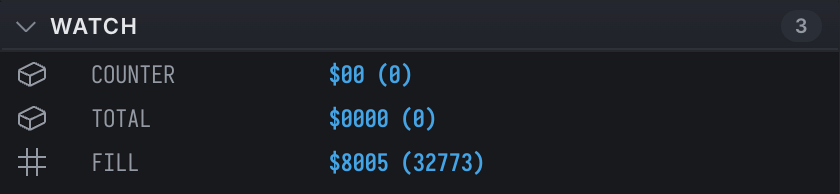
Each row represents a watch item with the following information:
- An icon showing the watch value category
- numeric (direct or indirect)
- string
- warning (when unresolved)
- The symbol name (uppercased)
- The current value (formatted)
When a watch cannot be evaluated yet (for example, compiled symbols or memory content are unavailable), it displays “<unknown>”. If the symbol is not found in the current compiled output, the value shows “<not found>”.
Adding and removing watches
You manage watches through interactive commands:
-
Add a watch
w-add [>]<symbol>[:<type>[:<length>]]>: optional; when present, uses the symbol’s direct value rather than reading from memory<type>:- b: 8-bit value
- w: 16-bit little-endian value
- -w: 16-bit big-endian value
- l: 32-bit little-endian value
- -l: 32-bit big-endian value
- f: flag (true/false)
- a: byte array (length required; default: 8 when omitted)
- s: string (length required; default: 8 when omitted)
-
Remove a watch
w-del <symbol> -
List watches
w-list -
Remove all watches
w-ea
In addition to commands, you can remove a watch directly in the Watch view by right‑clicking its icon.
Examples:
w-add playerScorew-add playerScore:ww-add >playerAddress:ww-add buffer:a:32w-add text:s:16
How values are shown
The Watch panel formats values based on the symbol’s type and whether the watch is direct or memory-based.
-
Direct integer values (uses ’>’)
- Always shown as 16-bit number: $HHHH (D)
- Example: $12AB (4779)
-
Memory-based integer values (no ’>’)
- The symbol’s integer value is treated as a 16-bit address
- The panel reads memory according to the selected type and endianness
- Displayed as $HH (D), $HHHH (D), or $HHHHHHHH (D) for 8/16/32-bit types
-
Strings (type: s)
- Reads up to
<length>bytes, stops at NUL (0x00) - Non-printable bytes are shown as ’.’
- Displayed quoted: ”…”
- Reads up to
-
Arrays (type: a)
- Displays up to the first 16 bytes as hex pairs separated by spaces
- If longer than 16 bytes, shows a suffix like: … (+N)
-
Flags (type: f)
- Shown as true or false (non-zero => true)
Moving the mouse over the watch item’s icon, shows the symbol’s display type in a tooltip.
Examples
w-add >frameCountershows a symbol’s own value as a 16-bit number, whatever the type.w-add ptr:wshows the 16-bit value stored atptr(little-endian).w-add textPtr:s:32shows up to 32 characters of the string attextPtr.w-add buffer:a:16shows the first 16 bytes of a buffer.
Without a length, arrays and strings show 8 bytes. w-list lists the watches with their types, to
check what you typed. Rebuild after changing code, so the symbols’ addresses are current.
Watchpoints
A watch shows a value; a watchpoint is a memory breakpoint. The two are linked:
- Right-clicking a watch row offers Break on write, Break on read and Break on access.
Each sets a memory breakpoint over the bytes the watch shows (one for a byte or flag, two for
a word, four for a double word, the length for an array or a string), and Remove watchpoint
takes it away again. The items are disabled for a direct (
>) watch, which reads no memory. The same menu has Delete watch; right-clicking the icon still deletes the watch, too. - A watchpoint made this way follows its symbol: after a rebuild that moves the symbol it
watches the new bytes, and while the build has no such symbol it does not stop.
bp-listshows it asWS:<symbol>. - A watch row shows the memory read or write glyph when any enabled memory breakpoint covers its
bytes: one you set, one made from a watch, or one from a DeZog
WPMEMcomment. Its tooltip lists them, and clicking the glyph shows the breakpoint in the Breakpoints panel. - In the other direction, the Breakpoints panel’s row menu offers Add to Watch on a memory breakpoint whose address a build symbol starts at, when no watch shows it yet.