Debugging the DMA
The ZX Spectrum Next’s DMA moves bytes while the CPU waits. When a transfer copies the wrong bytes, never starts, or freezes the program, the cause is in the DMA’s own registers, which the Z80 registers do not show and which a program can only read back one byte at a time. The DMA panel shows all of them at a pause, and names the usual mistakes with their evidence.
Applies to: ZX Spectrum Next. How the DMA works is explained in DMA: One Bus, Two Masters.
Finding out what a transfer did
Pause after the setup
Run the program in debug mode and pause it after it has written its setup to the DMA, for example on a
breakpoint after the OTIR that sends it.
Open the DMA panel
Open the Machine info activity and expand the DMA header, below Interrupts.
Read the warnings
The boxes under the State row name the usual causes with their evidence: an enable without a load, a register group still waiting for its bytes, a DMA left deaf by WR4 bit 4, auto restart that never gives the bus back, or a switched-off port.
Compare the start and working addresses
Start is what WR0 and WR4 wrote; Working is where the next byte comes from and goes to. They
differ until the next $CF, and during a transfer. A working address that has moved away from its start
is shown in the second accent colour.
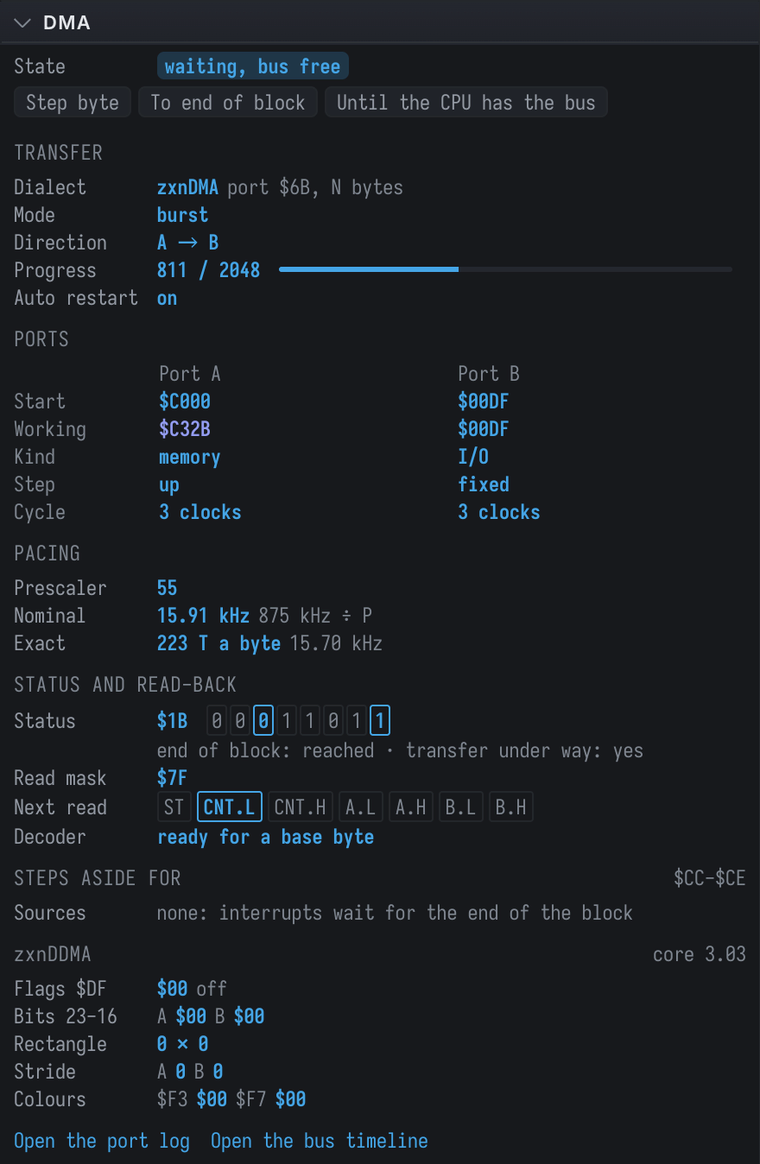
The DMA panel
State is what the DMA is doing at the pause:
| State | Meaning |
|---|---|
| idle | No transfer; block finished when the last block reached its end. |
| starting | Enabled; the DMA takes the bus at the next instruction. |
| waiting, bus free | Burst mode: the DMA waits for its prescaler and the CPU runs. |
| stepped aside | The DMA let go of the bus so the CPU can take an interrupt enabled in NextRegs $CC-$CE. |
| holding the bus | A transfer is under way and the CPU is stopped. |
| locked | Auto restart in continuous mode: the CPU never gets the bus back. |
| deaf | WR4 bit 4 without port B’s address: the DMA ignores every byte until a reset. |
A pause always falls between two CPU instructions, and Klive runs a transfer that keeps the bus to its end before the next instruction. So holding the bus appears only when the pause lands at the end of a frame in the middle of a long transfer.
Transfer shows the dialect (the port touched last: $6B moves N bytes for a block length of N,
$0B moves N + 1), the operating mode (byte mode, and burst mode without a prescaler, behave as
continuous), the direction, the bytes moved of the bytes to move, and auto restart.
Ports shows port A and port B side by side: the start and working addresses, whether the port is memory or I/O, how its address steps after each byte, and the clocks its read or write cycle takes.
Pacing appears when port B has a prescaler. Nominal is the formula’s 875 kHz ÷ P; Exact is the period worked out for the current CPU speed, 32 × P clocks of 28 MHz and then three CPU clocks (4 × P + 3 T-states at 3.5 MHz), or no effect at this speed when the wait is shorter than a byte. Contention and the SD card port can make real bytes a little later.
Status and read-back shows the status byte a read would give, 00E1101T, with what its E and T bits
mean; the read mask; which entry the next read of the port returns; and what the DMA expects as the next
byte written to it. The panel works the status byte out without reading the port, so opening it never
moves the read sequence.
Steps aside for lists the interrupt sources enabled in NextRegs $CC-$CE.
zxnDDMA appears on models with core 3.03: the $DF flags, bits 23-16 of both start addresses, the
rectangle, the strides, the transparent colour and the fill value.
The warnings
| Warning | What happened |
|---|---|
| Enabled without a load ($CF) | New start addresses were written after the last $CF, so the transfer used the old working addresses. |
| Enabled after a finished block | An enable without $CF or $D3 after a block ended moves one more byte, from just past the end. |
| WRn expects more bytes | A register group is waiting for follow bytes; the next byte written is taken as one of them. |
| The DMA ignores every byte | WR4 bit 4 without port B’s address. Only a reset frees it. |
| The CPU will not get the bus back | Auto restart in continuous mode. Only a reset, or an interrupt enabled in $CC-$CE, ends it. |
| The DMA keeps the bus while it waits | A prescaler in continuous mode freezes the CPU for the whole block; the warning estimates for how many frames. |
| Port $6B (or $0B) is switched off | NextReg $82 bit 5 or $85 bit 1 disables the port. |
| zxnDDMA settings stay on | Flags from an earlier $DF still apply to the next transfer until a $C3. |
Information notes also say when a prescaler has no effect at the current speed, when Z80 DMA mode moves one more byte, when a block length of 0 moves one byte, and when the step-aside enables need hardware IM2 mode.
The dma command
The dma command prints the same rows and warnings as text in the command output.
Stopping on DMA events
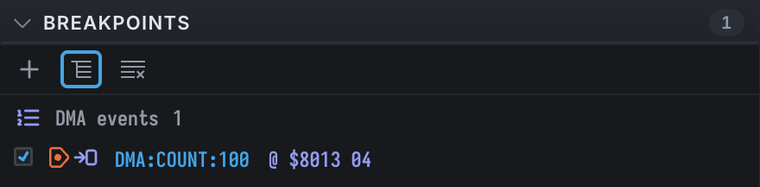
A DMA stop is a breakpoint bound to something the DMA does rather than to an address. Add one in the
Breakpoints panel with the DMA event type, or with bp-set:
| Command | Stops |
|---|---|
bp-set dma:enable | after the instruction that enabled the DMA |
bp-set dma:load | after the instruction that wrote $CF |
bp-set dma:end | after the byte that ends a block, an auto restart’s wrap included |
bp-set dma:count:256 | after the block’s 256th byte |
bp-set dma:write:$4000-$5AFF | after the DMA writes memory in the range |
bp-set dma:held:70000 | when one hold of the bus passes 70,000 T-states |
bp-set dma:problem | after a write the DMA ignores or that leaves it deaf, or an enable without a load |
An enable, a load or a setup problem happens inside the CPU’s OUT, so the machine stops after that
instruction. The other events happen inside a transfer, while the CPU waits for the bus: the machine stops
there, before the CPU’s next instruction, with the transfer half done, and the CPU panel shows the CPU as
held by the DMA. Continue, and the transfer goes on with its next byte. Hit counts, conditions and
logpoints work as on any breakpoint; port breakpoints already stop on the DMA’s port writes.
Stepping the DMA
While the machine is paused and the DMA has a transfer under way, the DMA panel shows three buttons:
- Step byte runs until the DMA moves its next byte (
step-dma). - To end of block runs until the block ends (
step-dma-block). - Until the CPU has the bus runs until the DMA lets go of the bus (
step-dma-release).
Who held the bus: the DMA Bus Timeline
The DMA Bus Timeline shows, frame by frame, when the DMA held the bus. Open it with Debug › DMA Bus
Timeline, the DMA panel’s Open the bus timeline link, or show-dma-timeline; it records while it is
open and shown, so open it, then run the program.
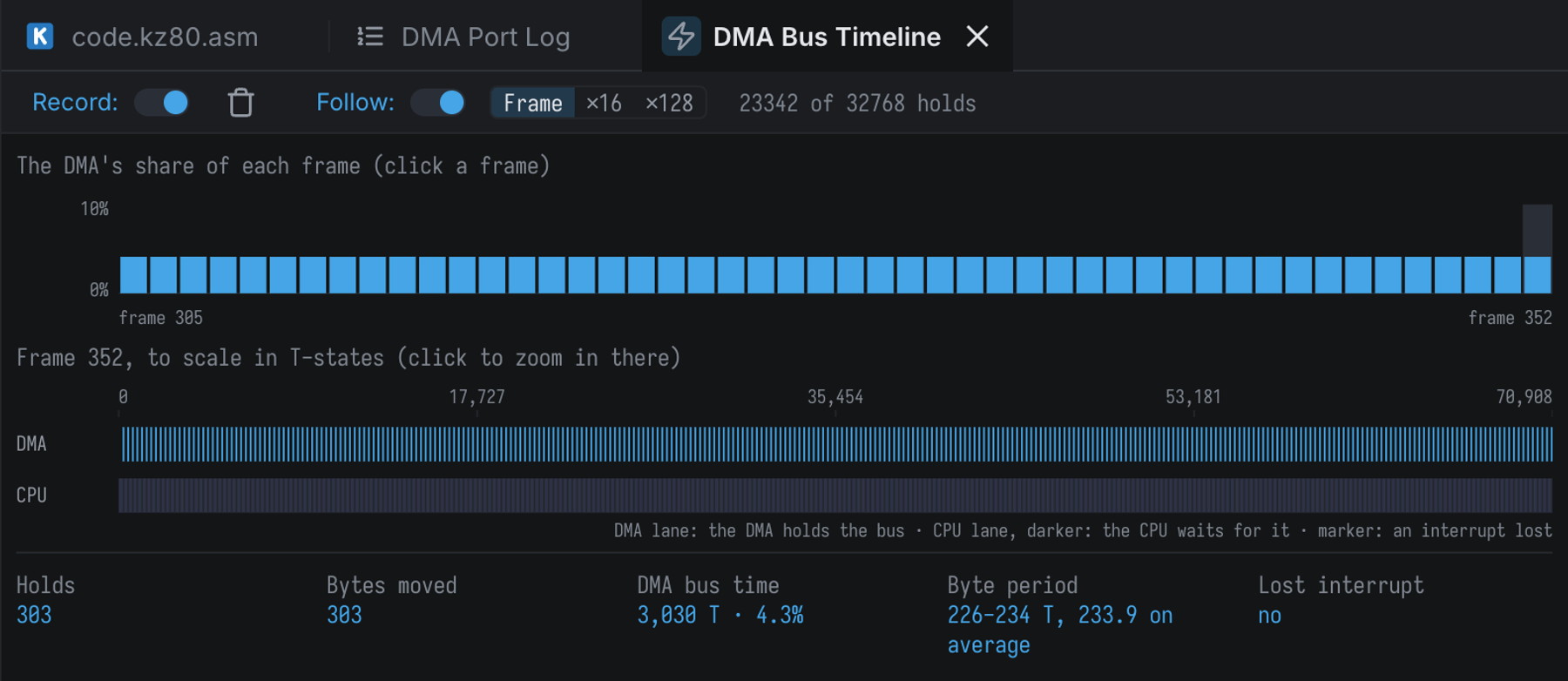
- The overview has one bar per frame: the share of the frame the DMA held the bus. A dot above a bar marks a frame in which a pulse-mode interrupt came and went while the DMA held the bus, so the CPU never saw it. Click a bar to look at that frame.
- The detail draws the selected frame to scale in T-states: the DMA’s holds on one lane, the CPU’s time on the other, darker where it waited. Click it to zoom in there; ×16 and ×128 zoom around the frame’s first hold.
- The figures below give the frame’s holds, the bytes moved, the DMA’s bus time and share, and for a paced transfer the byte period: the shortest and longest spacing of its bytes, and the average. The spacing is a little longer than the prescaler’s exact period, because the DMA gets the bus back only at the end of the CPU’s current machine cycle.
A continuous transfer is one long hold; one that runs past the end of a frame is split there, and a 16K copy at 3.5 MHz swallows the frame interrupt that falls inside it.
Where the bytes went: the DMA Transfers
The DMA Transfers document lists every transfer, from its enable to its end. Open it with Debug ›
DMA Transfers, the DMA panel’s Open the transfers link, or show-dma-transfers. It records while it
is open; a transfer already running when it opens is listed too, as started before recording.

Each row gives the instruction that enabled the transfer (click it to open the disassembly), its mode,
what it read and wrote, the bytes moved (of the block, while it runs), how long it held the bus, and how
it ended: done at the end of its block, disabled by $83, DMA reset by $C3, or still
running. Two warnings can follow:
- INT lost: a pulse-mode frame interrupt came and went while the transfer held the bus, so the CPU never saw it.
- not loaded: the transfer was enabled with start addresses written after the last
$CF, so it used the old working addresses.
Select a row to tint its bytes in the Memory panel, and click Show in memory to open it there. The bytes it read have the second accent’s wash, the bytes it wrote a green wash, and while it runs, a dashed frame marks the next byte. A running transfer shows the block under way, up to the byte the DMA has reached.
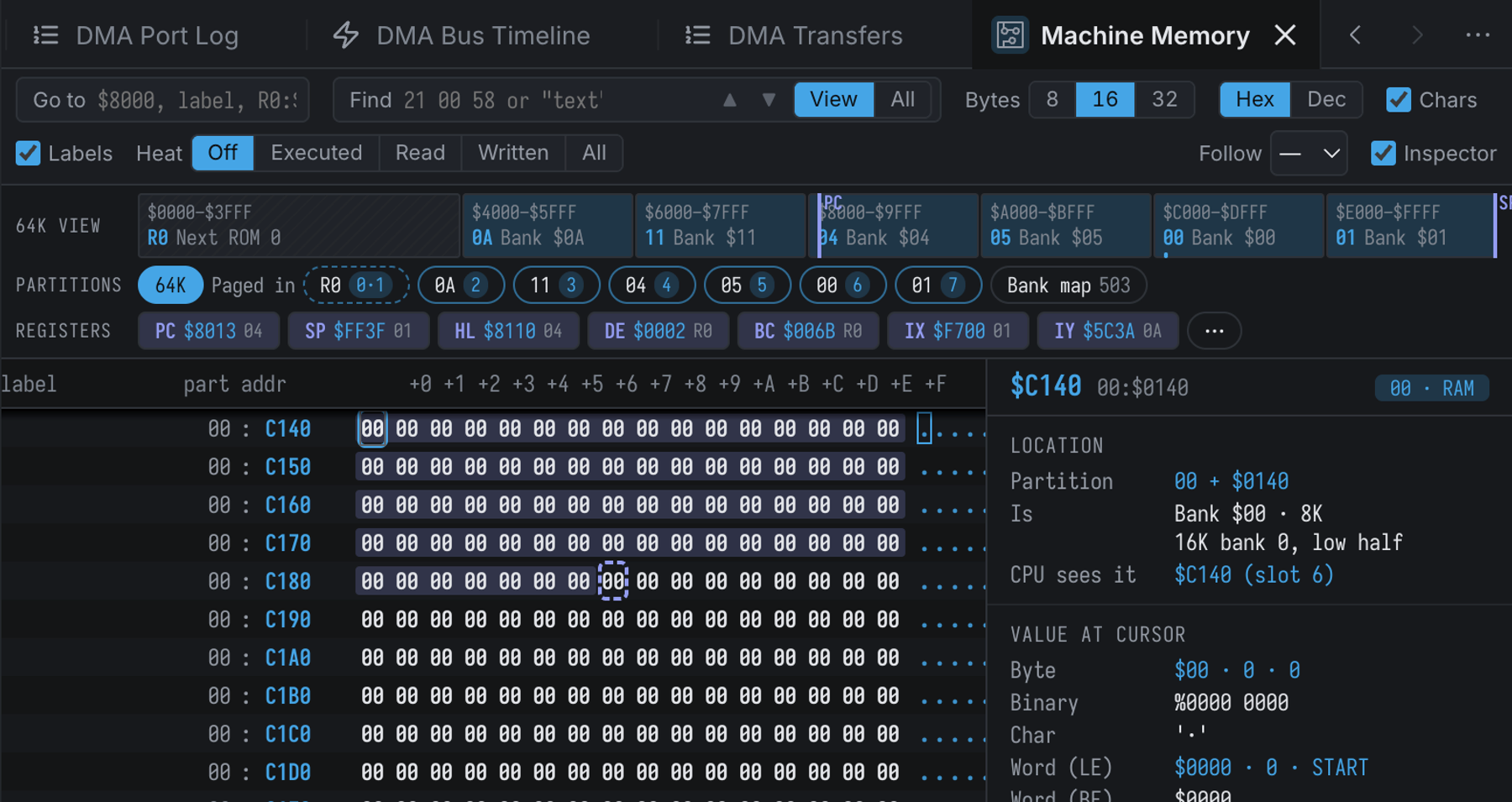
The ranges are the addresses the transfer used. The Memory panel’s 64K view shows them as they are, a bank view where the current paging puts them. Ports and zxnDDMA physical addresses are listed but not tinted.
What the program wrote: the DMA Port Log
The panel shows where the DMA ended up; the DMA Port Log shows how it got there: every byte written
to or read from ports $6B and $0B, with the frame, the T-state, the PC of the instruction, and what
the DMA did with the byte.
Open it before the program runs
Use Debug › DMA Port Log, the DMA panel’s Open the port log link, or the show-dma-log
command. It records while it is open, so open it before the setup you want to see.
Run, then pause
Each setup, the writes up to the one that enables the DMA, gets a header with its first PC. Click a PC to open the disassembly there.
Read the rows
A base byte names its register group and what it sets; its follow bytes are indented under it. The rows show what the DMA actually took: a byte the program meant as a new group but the DMA took as a follow byte of the group before it shows as that follow byte.
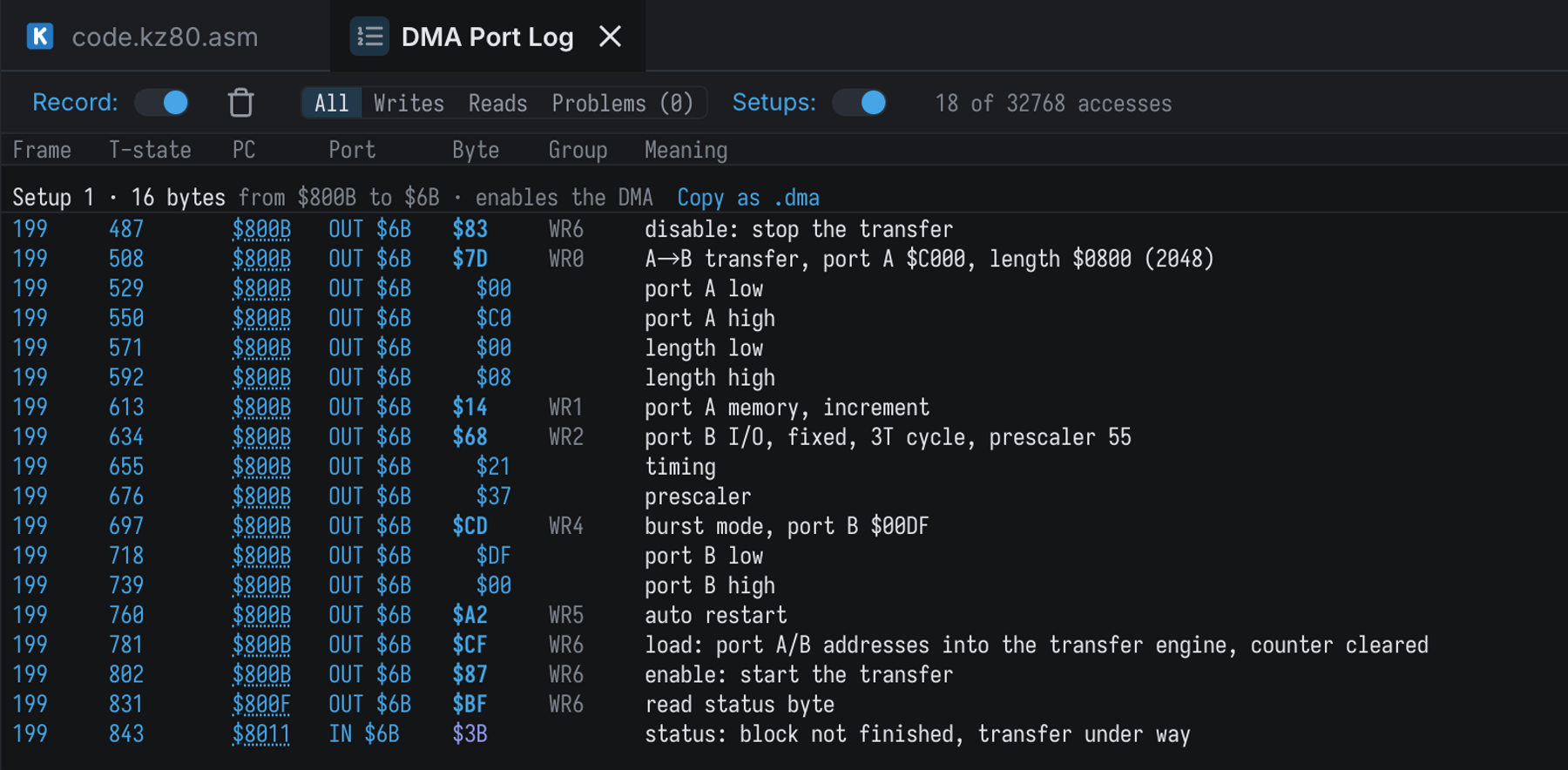
Problems filters the rows the DMA ignored or that did not do what they look like: a byte written while
the DMA is deaf, the WR4 that made it deaf, a byte that matches no register group, an enable after new
start addresses without $CF, and a zxnDDMA command sent to $0B. Copy as .dma in a setup’s header
copies it as .dma lines for the Klive assembler.
Before the program runs
When the program is written with the .dma pragma, the
build already warns about several of these mistakes, and the editor shows a line above each program
that says what it does. With Compile in the background on, both appear as you type.
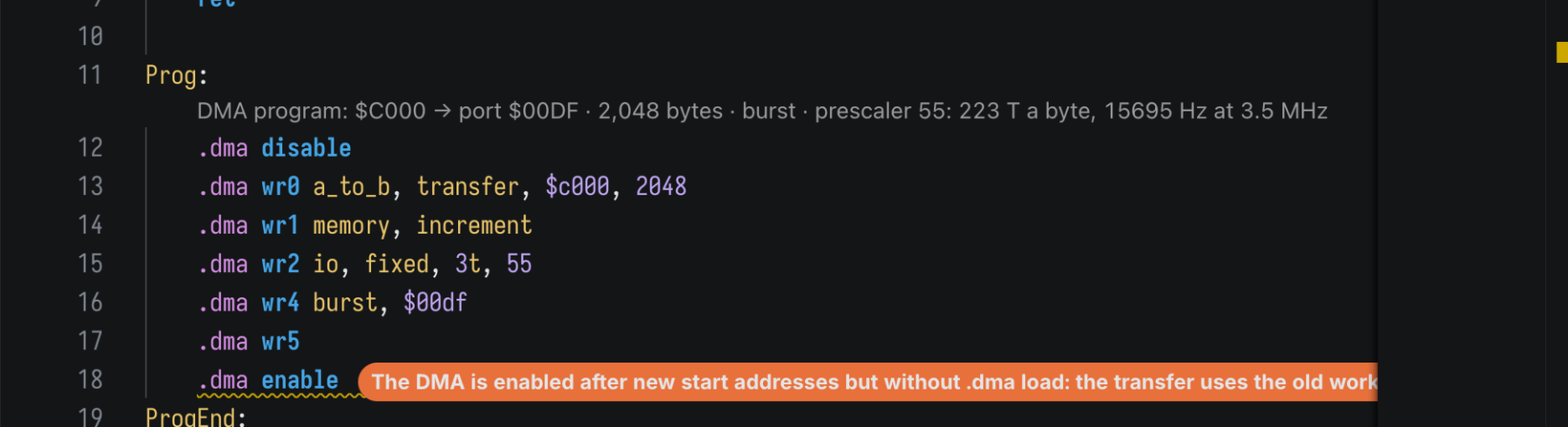
Hovering a .dma line decodes its register group and repeats the summary:

The warnings are listed in the .dma pragma reference.
Related pages
- Debugging interrupts: the interrupts the DMA steps aside for.
- Next breakpoints: port breakpoints also stop on writes the DMA makes.