Conditions, Hit Counts and Logpoints
A breakpoint that stops every time is too blunt for a loop that runs a thousand times. This page shows how to make a breakpoint stop only when an expression is true, only on a chosen hit, or not at all: a logpoint writes a message to the Log pane and lets the program run on. Setting breakpoints in the first place is in Breakpoints.
Applies to: every machine.
Add a condition
Open the breakpoint’s dialog
Right-click the breakpoint in the editor margin and choose Edit Condition…, or double-click its row in the Breakpoints panel and select the Condition page. On an empty line, Add Conditional Breakpoint… sets the breakpoint and opens the dialog on that page in one go.
Type the condition
Enter an expression in Condition, for example A == $FF && !ZF. It is checked as you type: a
mistake is shown under the field with its column, and a label the last build does not define is a
warning.
Optionally, set a hit count
Choose a rule in Hit count (Equal to, At least, Every, …) and a number. Then click Save (Add for a new breakpoint).
From the command prompt, the same breakpoint is
bp-set $8000 -if "A == $FF && !ZF" -hit *4; see bp-set.
Conditions and hit counts
Every breakpoint (execution, memory, I/O, NextReg, bank-relative, label-anchored and source-code) can carry a condition and a hit count rule. The machine stops only if the condition is true; a hit is counted only when it is, and the rule then decides whether this hit stops. A hit is counted once each time the program reaches the breakpoint, also when you step onto it, or go back to it in the execution history.
Some examples:
A == $FF && !ZF
HL > $C000
(B & %0000_0111) == 3 || CF
[IX+3] == 0
w[$5C3A] > 100
wbe[$8000] == $1234
l[HL] == "KLIV"
sb[IX+2] < -1
s16(HL) < 0
b[05:$C010] == $FF
w[0A:+$0100] == score
VAL == $C9
ADDR >= $5800 && ADDR < $5B00
page($C000) == @B5
nr($56) == $0A
w[score] >= 1000
AF' == $0044
Values
| Form | Example | Notes |
|---|---|---|
| Decimal, hexadecimal, binary | 100, $FF, 0xFF, %1010, 0b1010 | _ separates digits: %0000_0111 |
| Character | 'A', '\x7F', '£' | One character, as its ZX Spectrum code (£ is $60, © is $7F, ↑ is $5E); escapes \\ \' \" \n \r \t \0 \xHH |
| String | "KLIV" | Only compared (==, !=) with an unsigned memory read of the same length: 1, 2 or 4 characters, in memory order |
| Partition | @B5, @R0, @0A | A partition name, to compare with page(…) |
Registers, flags and specials
Names are case-insensitive.
- 8-bit registers:
A F B C D E H L I R IXH IXL IYH IYL(alsoXH XL YH YL). - 16-bit registers:
AF BC DE HL IX IY SP PC WZand the shadow setAF' BC' DE' HL'. - Flags, each 0 or 1:
SF(sign),ZF(zero),F5ForYF(bit 5),HF(half carry),F3ForXF(bit 3),PVF,PForVF(parity/overflow),NF(subtract),CF(carry).CandHare registers, which is why the flags have their own names. VAL: the byte read or written (memory), the port value (I/O), the new register value (NextReg).ADDR: the address or the 16-bit port accessed. Not on execution breakpoints.
Memory
| Read | Bytes | Range |
|---|---|---|
[a], b[a] | 1 | 0 … 255 |
w[a] / wbe[a] | 2, little- / big-endian | 0 … 65535 |
l[a] / lbe[a] | 4, little- / big-endian | 0 … $FFFFFFFF |
sb[a], sw[a], swbe[a], sl[a], slbe[a] | signed versions | two’s complement |
The address is any expression: w[HL], [IX+3], w[score].
w[HL]reads memory as the CPU sees it now; the address wraps at$FFFF.b[05:$C010]reads partition05at the offset of$C010, whatever is paged in: the same spelling asbp-set 05:$C010.b[0A:+$0100](ZX Spectrum Next) reads 16K bank0Aat offset$0100.b[05:Flags](ZX Spectrum Next) reads the bank-local labelFlagsof a.nex.dissidecar in bank05. Writeb[05:(score)]to use a global label as a partition offset instead.- Outside brackets,
05:Flagsis the value of an annotation label in bank05on every machine with banks, andROM:SA_BYTESthe address of a ROM label. - On a machine without banks, the part before the colon is ignored.
Reading memory in a condition has no side effects on the machine.
Functions
page(addr) is the partition paged in at addr; nr(reg) is a Next register’s value (ZX Spectrum
Next); s8(x), s16(x) and s32(x) read the low 8, 16 or 32 bits of x as a signed number.
Four functions take no argument and read the machine: tstates() is the number of T-states since
the machine started, cpufreq() the current CPU clock in Hz (turbo included), frame() the number
of frames since the machine started, and slots() the partition paged into each slot, as text
(R0 B5 B2 B0), so slots() can only be a whole logpoint placeholder.
Operators
From the lowest precedence to the highest: ||; &&; the comparisons == != < <= > >=; |; ^;
&; the shifts << >> >>>; + -; * /; and the unary ! ~ -. / divides whole numbers,
dropping the fraction (7 / 2 is 3, -7 / 2 is -3); dividing by zero makes the condition fail
safe, so the breakpoint stops. There is no % operator: % starts a binary number. Bitwise operators bind tighter than
comparisons, so A & $80 == 0 means (A & $80) == 0. Comparisons cannot be chained.
Arithmetic and comparison work on exact numbers, so signed and unsigned values compare correctly.
& | ^ ~ give an unsigned 32-bit result (~0 == $FFFFFFFF); the shifts work exactly as in
JavaScript (1 << 31 is negative; write (x << n) >>> 0 for an unsigned result).
Labels
Any other name is a label of the last successful build (and, for a .nex file, its .nex.dis
sidecar), resolved again after every build. Register and flag names win; write a label that
collides with one in backticks: w[`ZF`].
A condition that names a label the last build did not define is inactive: the breakpoint does not stop and does not count, and the view shows it hollow and muted, with the reason in its tooltip. It comes back by itself once a build defines the label.
Checks
A condition is checked when you set it: a syntax error, a string of the wrong length, VAL on an
execution breakpoint, a partition the machine does not have, or a constant that the value it is
compared with can never hold (b[HL] == $1234, A > 300, A > -1, ZF == 2) is refused with its
column. The range check applies to constants written as literals - numbers, negative numbers,
characters and partition names; a constant written as an expression (A == 255 + 1) is not checked,
and simply never matches.
Conditions are evaluated inside the emulated machine’s core, next to its registers and memory, so a condition costs little even on an address the program passes thousands of times a second.
Hit counts
| Rule | Stops on hit… |
|---|---|
10 or =10 | 10 only |
>10 | 11, 12, … |
>=10 | 10, 11, … |
<10 | 1 … 9 |
<=10 | 1 … 10 |
*10 | 10, 20, 30, … |
Each breakpoint counts its own hits. The counters start from zero when the machine restarts
(Start after Stop, Restart, a reset) and when you reset them — from the view, the dialog,
the editor’s margin or bp-reset-hits. Pausing, stepping and
editing the breakpoint keep them.
Logpoints
A logpoint is a breakpoint that logs a message instead of stopping. When a debug run reaches it, its message is filled in from the machine’s state and written to the Log output pane, and the program goes on as if nothing had happened.
A logpoint is set like any breakpoint — at an address, a partition address, a bank-relative
address, a source line, or on memory, I/O and NextReg access — and can carry a condition and a
hit rule: then it logs only when the condition is true and the rule says so, and its hit counter
counts the lines it logged. Set one with -log on bp-set, with the
Action page (Log message) of the breakpoint dialog, or with Add Logpoint… in the editor’s
margin menu:
bp-set $8000 -log "x={A} at {PC:hex16}"
bp-set [code/code.kz80.asm]:42 -log "[LOOP] B={B}" -hit *100
bp-set $5800 -w -log "attribute {ADDR} = {VAL:bits}"
In the margin, the Breakpoints panel and the disassembly, a logpoint is drawn as a diamond rather than a dot, with the same ”=” and hollow variants. When a logpoint and a breakpoint that stops share an address, the logpoint logs and then the machine stops.
A logpoint logs once each time execution arrives at it: continuing or stepping from a logpoint the machine is sitting on does not log it a second time.
The message
x={A} at {PC:hex16}
[SPRITES] sprite {B} at {w[IX+2]:hex16}, visible={b[IX+4] & $80 != 0}
{{literal braces}} and a dollar $ sign{opens a placeholder and}closes it; write{{and}}for literal braces.- A placeholder holds a full condition expression, so
{A == 3}prints 0 or 1. - An optional
:formatends a placeholder. Only a:outside brackets and parentheses followed by a format name counts, so{b[05:$C010]}and{05:Flags}keep their meaning; a bank-local label whose name is a format name is written in parentheses:{(05:hex8)}. - A leading
[NAME](letters, digits,_and.) is the logpoint’s group and is not printed. Without one, the group isDEFAULT.
| Format | Prints | Value $F3 |
|---|---|---|
hex8 / hex16 | 2 / 4 hexadecimal digits, no $ | F3 / 00F3 |
uint8 / uint16 | the low 8 / 16 bits, unsigned | 243 |
int8 / int16 | the low 8 / 16 bits, signed | -13 |
bits | binary: 8 digits below 256, otherwise 16 | 11110011 |
string | the value is an address: the bytes there up to a 0 (at most 64), with £, ©, ↑ mapped back | HELLO |
| (none) | a bare register, flag, VAL, ADDR or unsigned memory read: $ and as many digits as it reads ($3F, $C000; a flag prints 0/1); anything else in decimal | $F3 |
A message is checked as you type it, with the same column-accurate errors as a condition. A
division by zero prints <division by zero> in place of the value, and the line is still logged.
The Log pane
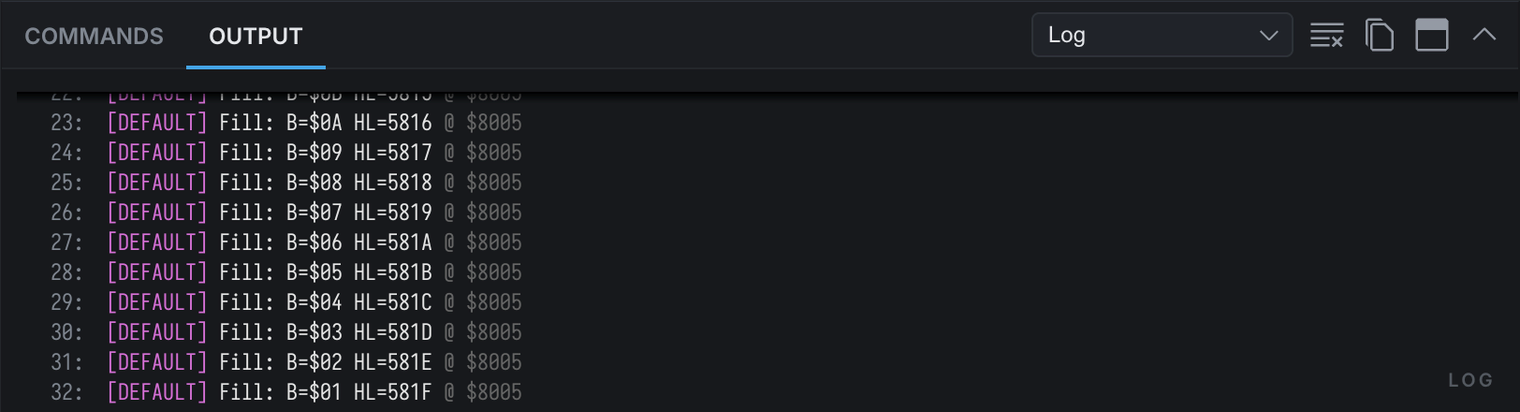
Each line reads [GROUP] message @ $8012 — the group, the message, and where it fired. The
first line of a debug session also leaves a note in the Emulator pane. At most 256 lines are kept
per frame; a logpoint in a tight loop that produces more reports the rest as one line
(… 1 234 log lines dropped in this frame), so the IDE stays responsive. Logpoints work in debug
runs only, on the Z80 machines.
Groups
Groups can be switched on and off without touching the logpoints themselves:
lp-en switches all of them, or logs only the groups you name, and
lp-groups lists them. In the Breakpoints panel, the Log groups
section has a checkbox for each group. The switch is saved with the project. A logpoint logs only
when both it and its group are enabled.
Related
- Breakpoints
- Breakpoints from source comments:
LOGPOINTandASSERTIONcomments - Reverse debugging: conditions in the past
bp-setin the command reference