Debugging Palettes
The ZX Spectrum Next draws every layer through a palette, and a wrong colour on screen usually means a palette entry was written by the wrong code, at the wrong time or into the wrong bank. Klive shows which entries changed since the machine last stopped, the colour each one had before, and can stop the machine on the write itself. Use this page when the question is who changed this colour.
Applies to: ZX Spectrum Next.
Finding who writes a colour
Open the Palette document
Use View › Machine Views › Palettes, the pop-out button in the header of the Next Palettes
panel (Machine info activity), or show-palettes. Add a device to start on it: show-palettes spr.
Pick the device and the entry
Click the device’s tab (ULA, Layer 2, Sprites or Tilemap), then the entry in either bank. The details column decodes it.
Set a breakpoint on it
Click Break on writes to $03, or right-click the swatch and choose the same command. Choose Break when $03 changes instead when the program rewrites the palette every frame with the same colours.
Run and let it stop
Switch on Follow changes, then run. When the machine stops, the document shows the entry that was written, its old and new colour, and the address of the instruction that wrote it.
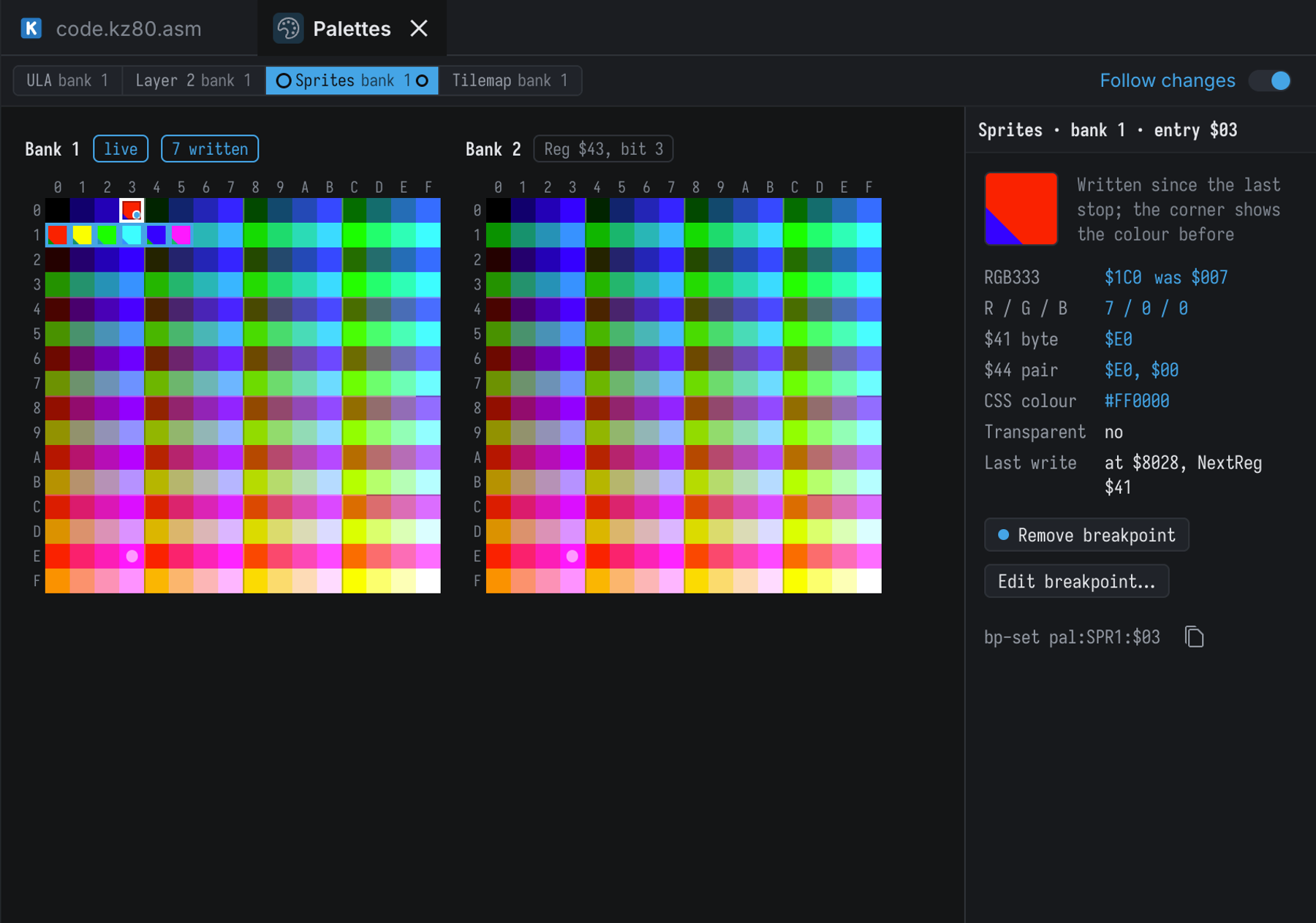 12
- Entries written since the last stop are framed, with their colour at that stop in the bottom-left corner.
- Follow changes selects the written entry at every stop.
The Palette document
Each device has two banks of 256 colours, and a register bit says which bank the device draws with
(NextReg $43 for the ULA, Layer 2 and sprites, $6B for the tilemap). The document shows both
banks of the selected device side by side and tags the live one; the other bank’s tag names the
register bit that would select it.
The device tabs show which bank is live and two marks: one after the name when the device’s palette was written since the last stop, one before the name when a palette breakpoint watches it.
On the grids:
| Mark | Meaning |
|---|---|
| Frame | Written since the last stop. While the machine runs: since the run started. |
| Triangle in the bottom-left corner | The entry’s colour at the previous stop, when the write changed it |
| Dot in the bottom-right corner | A palette breakpoint watches the entry (muted when it is disabled) |
| Disc in the middle | The device draws the entry as transparent |
“Written” means any store, even of the colour the entry already had: that is what a program that uploads its whole palette every frame does, and it is still a write you may want to see.
Transparency is an entry for sprites and the tilemap (NextReg $4B and $4C). For the ULA and
Layer 2 it is a colour (NextReg $14), so every entry whose colour matches is marked.
Entry details
The details column decodes the selected entry:
- RGB333: the 9-bit colour, with its value at the previous stop when the write changed it.
- R / G / B: the three levels, 0 to 7 each.
- $41 byte and $44 pair: what a program writes to store this colour through NextReg
$41(eight bits) or$44(two writes, the second carrying blue’s low bit and the priority bits). - Priority (Layer 2 only): the colour is drawn over the other layers.
- CSS colour: the colour as Klive draws it.
- Last write: where the write that stopped the machine happened, and whether the CPU, the Copper or the DMA made it. Shown when a palette breakpoint stopped on this entry.
The buttons set or remove the entry’s breakpoint and open the breakpoint dialog on it, and the
bp-set line below them can be copied to the clipboard. Right-clicking a swatch offers the same
commands.
The document only reads the palettes; to edit a palette file, use the palette editor.
The Next Palettes panel
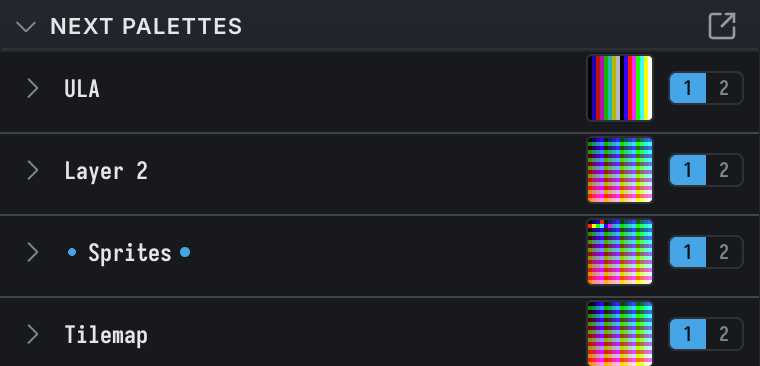
The Next Palettes panel in the Machine info activity is the compact view: one row per device with a thumbnail of its palette and the bank buttons (see Next Registers, memory mapping and palettes). It carries the same two marks as the document’s tabs, and its pop-out button opens the Palette document.
Palette breakpoints
A palette breakpoint stops the machine after the instruction during which a watched palette entry was written, or during which a device’s live bank flipped:
bp-set pal:spr1:$03            ; entry $03 of the first sprite palette
bp-set pal:l2:$00-$0f          ; entries $00-$0F of either Layer 2 palette
bp-set pal:ula2                ; any entry of the second ULA palette
bp-set pal:any                 ; any palette entry
bp-set pal:tm:live             ; the tilemap starts drawing with its other bank
The palettes are ula, l2, spr, tm and any. A 1 or 2 after the device picks one bank;
without it both banks are watched.
It catches every way a program stores a colour: NextReg $41, the second write of NextReg $44,
and the ULA+ data port $FF3B, by the CPU or the DMA. A bank flip is a write to NextReg $43
bits 1-3 or $6B bit 4 that changes the bank.
-calso stops on the Copper’s writes. They are left out by default, because a Copper list that changes colours per line would stop the machine on every frame.-changedstops only when the write gives the entry a different colour.
bp-set pal:l2:$00 -c -changedHit counts, conditions, logpoints and one-shots work as on any other breakpoint. In a condition,
palNew and palOld are the colour after and before the write (9 bits, with the priority bits
above them), palSlot the palette (0-3 the first banks of ULA, Layer 2, sprites and tilemap, 4-7
the second banks) and palIndex the entry:
bp-set pal:spr -if palIndex >= $10 && palNew == $1C0The Palette write type of the Breakpoint dialog sets the same breakpoints with a form. The Breakpoints view lists them in their own group and, after a stop, shows the entry’s old and new colour and where the write happened. The output pane says it in words:
Palette breakpoint: Sprites bank 1 entry $03 $007 -> $1C0 through NextReg $41, written at $8028 in 05While a palette breakpoint is enabled, the debugger runs the program one instruction at a time to name the writing instruction exactly, so a debug run is slower than usual. Disable the breakpoint to run at full speed.