The Interface 1 and Microdrives
The ZX Interface 1 sits under a ZX Spectrum and drives up to eight Microdrives: small tape
loops in cartridges that hold about 85-100K each and find a file in a few seconds. Its own ROM adds
the Microdrive commands to BASIC: FORMAT, CAT, SAVE *, LOAD *, ERASE, MOVE and the
OPEN # streams.
Applies to: ZX Spectrum 16K, 48K, 128K.
Klive emulates the Interface 1 on the ZX Spectrum 16K, 48K, 128K and +2, with two Microdrives.
Cartridges are .mdr files, the format other emulators use too. The +2A/+3 cannot take the
interface, and neither can the Pentagon or the Scorpion.
Connecting the interface
- Select a ZX Spectrum 48K or 128K.
- Turn on Machine › Interfaces › Interface 1. The machine restarts with the interface.
The DivMMC is in the same menu. Both interfaces answer the same port, so connecting one disconnects the other, and Klive says so.
Klive ships the Interface 1’s second-edition ROM (see the notice below). To run another 8K ROM, for example the first edition, name it in Settings › Machine › Interface 1 ROM. Leave it empty for the shipped one.
The Interface 1 ROM is © Sinclair Research, whose rights have passed to others since. Klive ships it, as other emulators do, for use with the emulated interface; it will be removed on request.
Cartridges
With the interface connected, Machine › Interfaces has these items for Microdrives 1 and 2:
| Item | What it does |
|---|---|
| Insert Cartridge into Microdrive 1… | Puts an .mdr file into the drive (Change Cartridge once one is in) |
| New Blank Cartridge in Microdrive 1… | Creates an unformatted cartridge file and inserts it, ready for FORMAT. With a project open, the file goes into the project’s cartridges folder |
| Save Cartridge in Microdrive 1 As… | Writes the cartridge, as the machine left it, to a new file, which then takes the drive |
| Eject Microdrive 1 | Takes the cartridge out |
| Write Protect Microdrive 1 | Breaks off the cartridge’s tab: the ROM then reports Drive 'write' protected |
Whatever the Spectrum writes to a cartridge is written back into its .mdr file straight away, sector
by sector. The emulator’s media strip shows both drives; a drive’s icon lights up while its motor
runs.

The IDE command crd makes cartridges too: crd mdr games makes a
formatted one with all 254 sectors free (CAT shows 127K), crd mdrblank work an unformatted one.
Both go into the open project’s cartridges folder, or into Klive/Cartridges in your home folder
when no project is open.
The Disk Explorer opens an .mdr: it lists the files, previews
them, and adds, extracts, renames and deletes them.
Using the Microdrives from BASIC
The commands name a drive with "m";n:
FORMAT "m";1;"games"
CAT 1
SAVE *"m";1;"hello" LINE 10
LOAD *"m";1;"hello"
SAVE *"m";1;"pic" SCREEN$
LOAD *"m";1;"code" CODE 32768
VERIFY *"m";1;"hello"
ERASE "m";1;"hello"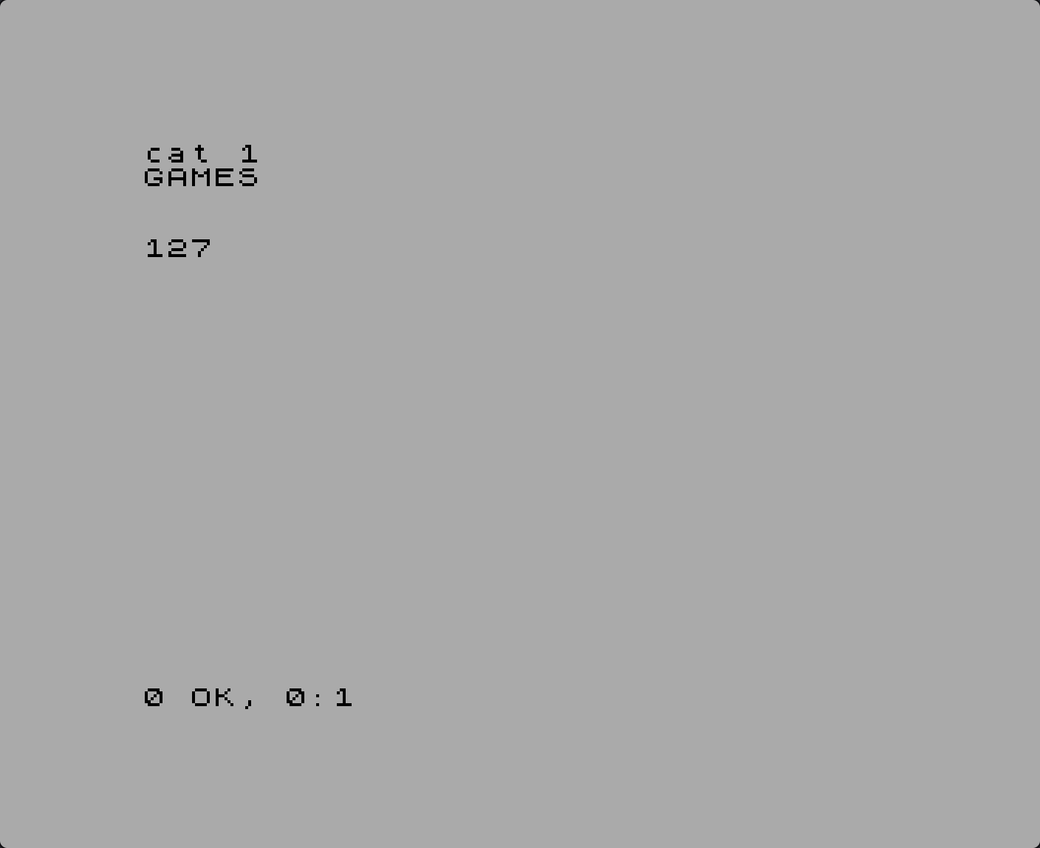
FORMAT on a blank cartridge takes as long as on the real drive (the tape goes round several
times), and CAT shows how much room is left. The 128K and +2 run these commands from 48 BASIC and from 128 BASIC alike.
The 128 BASIC editor has a known fault with the Interface 1: an error report, for example after
OPEN #4,"x", runs past the end of its line. Klive reproduces it; use 48 BASIC if it bothers you.
Booting a cartridge
Machine › Interfaces › Boot Cartridge in Microdrive 1 resets the machine and types RUN (on the
128K it selects 128 BASIC first). With no program in memory, RUN makes the Interface 1 load and
run the file named run from drive 1, as on the real machine.
Export Code with the mdr format (or expc game.mdr -f mdr) puts a compiled program on a new
formatted cartridge with a run loader, so it boots this way. Insert the cartridge, then boot it.
A program that uses the 128K memory banks cannot be exported to a cartridge yet.
The IDE’s Run and Debug work with the interface connected, as do tapes and their fast load.
Fast Microdrive
A real Microdrive turns at its own speed, so a SAVE * takes several seconds and a FORMAT much
longer. Machine › Interfaces › Fast Microdrive runs the emulator as fast as it can while a
Microdrive motor runs, then returns to normal speed. The Spectrum sees no difference.
Things to know
- RS232 and the network are there for the ROM, but nothing is connected: what is sent goes nowhere, and nothing arrives.
- The “IN 0” hang. Reading the Microdrive data port with no cartridge turning holds the CPU, as on the real interface. The emulator looks frozen; reset the machine.
- Debugging. While the Interface 1 ROM is paged in, it replaces the Spectrum ROM at
$0000. On the 128K the debugger shows it as the memory partition IF; on the 48K the memory views show its bytes there.
Snapshots and machine states
- A
.szxsnapshot keeps the interface (and whether its ROM was paged in) and links the cartridges to their files. Loading one connects the interface and inserts the cartridges it finds, looking where the file says and then beside the snapshot. - A
.z80keeps the interface and its paging, but not the cartridges. - A
.snakeeps neither; saving one says so. - A machine state keeps the cartridges with everything written to them. After you load one, the cartridges are not written back to their files until you insert a cartridge again.
- An RZX recording made with a cartridge plays back without one: the recording holds what the Spectrum read.
Related
- Disk images and the Disk Explorer: open an
.mdrcartridge - Custom ROMs: another Interface 1 ROM
- Exporting your program