Your first BASIC program
ZX BASIC is a compiled dialect of the ZX Spectrum’s own BASIC, with subroutines, local variables and typed variables. Klive compiles it with Boriel BASIC, the compiler of the language’s author, which comes with Klive. The compiled program runs far faster than interpreted BASIC, and you can debug it line by line in its BASIC source.
Boriel BASIC 2 is a beta. Most programs build and run, but expect rough edges.
Install Boriel BASIC
The first time Klive starts, it offers to install Boriel BASIC. If you chose Not now then, open Settings › Integrations, click Configure… next to Boriel BASIC, and click Install. Klive cannot build BASIC programs until it is installed.
Create the project
Choose File › New Project… as on the first assembly page, with these settings:
- Machine type: ZX Spectrum 48K.
- Project Template:
zx-basic. - Project name:
BouncingBall.
The project’s source file is code/program.zxbas.
Write the program
Replace the contents of code/program.zxbas with this program and save it:
' Bouncing ball - the program of Get Started, step 7.
' A ball bounces between the screen's edges and counts its bounces.

DIM x AS INTEGER = 15
DIM dx AS INTEGER = 1
DIM bounces AS UINTEGER = 0

SUB DrawBall(column AS INTEGER, ball AS STRING)
    PRINT AT 10, column; ball
END SUB

CLS
PRINT AT 0, 0; "Bounces: 0"
DO
    DrawBall(x, " ")
    x = x + dx
    IF x = 0 OR x = 31 THEN
        dx = -dx
        bounces = bounces + 1
        PRINT AT 0, 9; bounces
    END IF
    DrawBall(x, "O")
    PAUSE 2
LOOP
A few things that Sinclair BASIC does not have:
- No line numbers. Lines run in order, and
DO…LOOPrepeats the lines between them. - Typed variables.
DIM x AS INTEGERdeclares a whole-number variable, which is much faster than the Spectrum’s floating-point numbers. - Subroutines with parameters.
SUB DrawBalltakes a column and a string, andDrawBall(x, "O")calls it. - Block
IF. The lines up toEND IFrun when the condition is true.
Run it
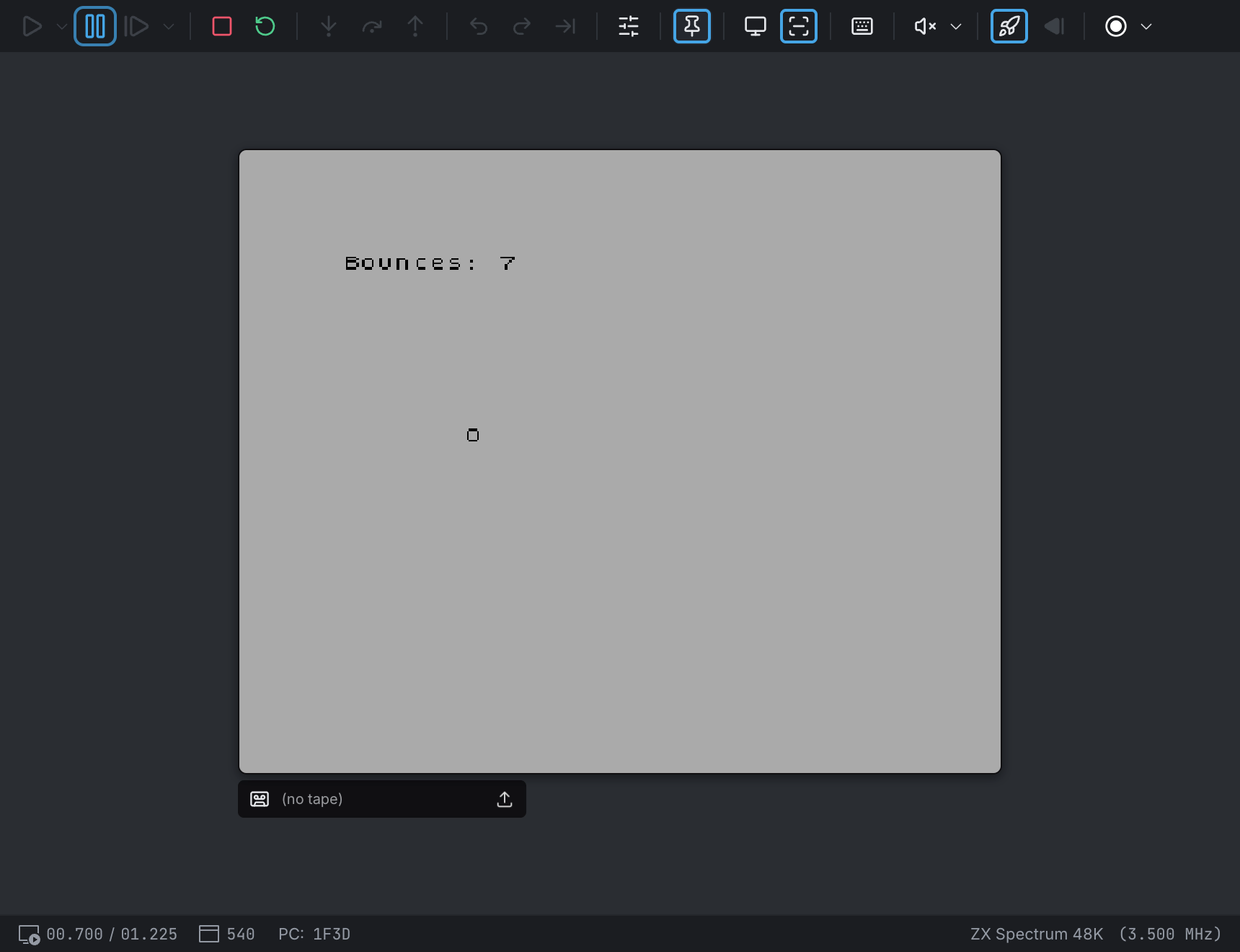
Click Run on the build bar, or press F5. The ball moves along line 10 and turns back at the edges of the screen, and the counter at the top counts the bounces.
Debug it
Set a breakpoint in the subroutine
Click left of line number 9, the PRINT AT 10, column; ball line inside DrawBall.
Start debugging
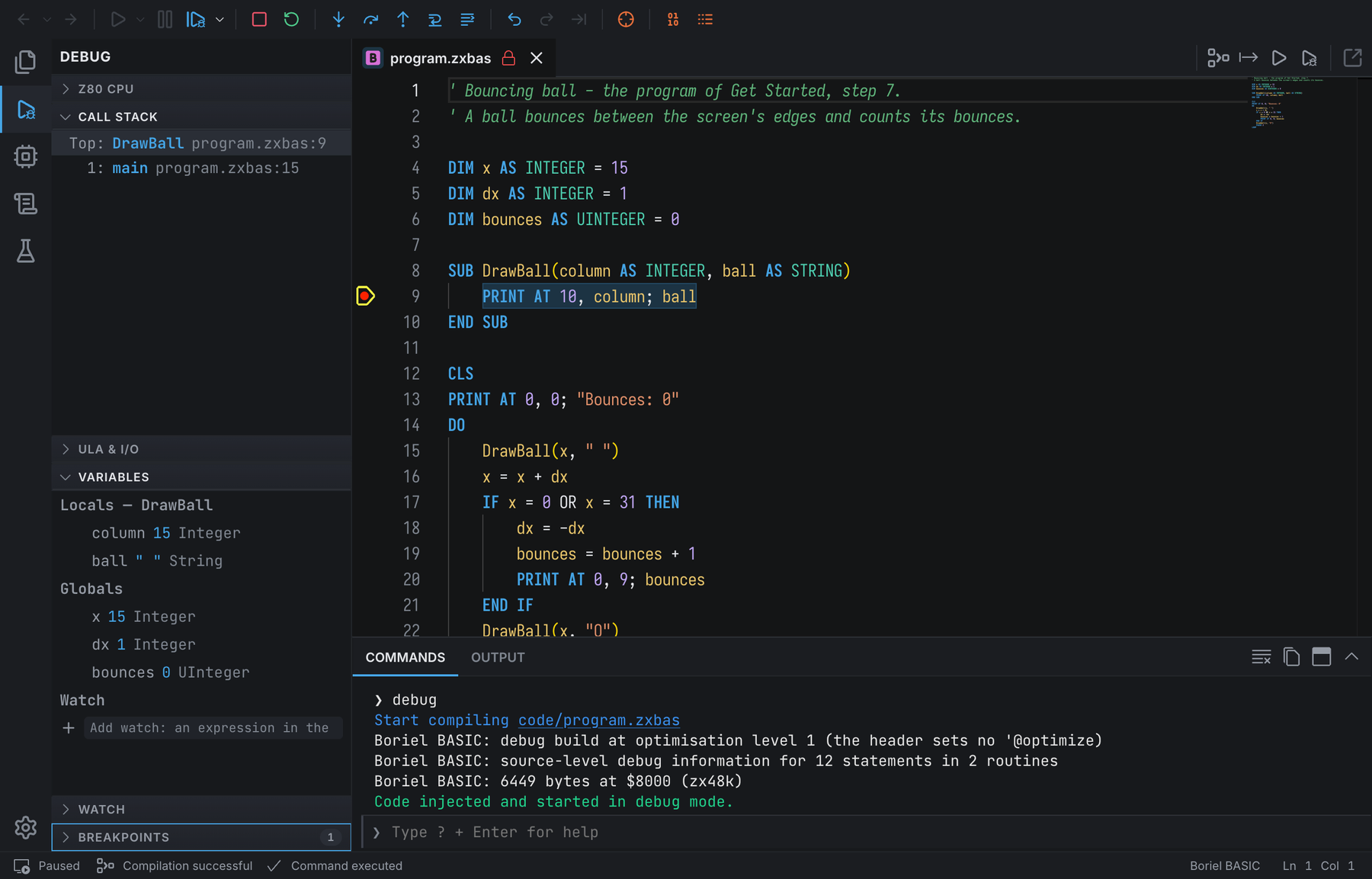
Click Debug on the build bar, or press Ctrl+F5. The program stops the first time it calls DrawBall.
Look at the call stack and the variables
Open the Debug side bar, then open its Call Stack and Variables panels by clicking their titles.
 123
- The breakpoint, and the statement that runs next.
- The Call Stack:
DrawBallwas called from line 15 of the main program. - The Variables: the subroutine’s parameters (
columnis 15,ballis a space), and the program’s global variables.
Stepping works on BASIC statements, not on Z80 instructions: F10 runs the next statement, F11 (F12 on macOS) steps into a subroutine, and Shift+F11 steps out of it. Press F5 a few times, and watch column and x change.
Boriel BASIC describes the build options, modules and banked code, and what the debugger shows. The language itself is described in Boriel BASIC’s own documentation .
Next, write your first ZX Spectrum Next program.