The Enterprise 64 and 128
The Enterprise was a British home computer of 1985: a Z80 at 4 MHz, two custom chips (NICK for the picture, DAVE for memory paging, sound and interrupts), up to 256 colours, stereo sound, and the EXOS operating system with IS-BASIC on a cartridge. This page covers the models, typing, loading programs from your computer’s folders and from tape, the floppy card, running your own machine code, and debugging.
Applies to: Enterprise 128, Enterprise 64
Models
Choose a model with Machine › Machine Type or Select machine… (see Choosing a machine):
| Model | RAM | ROMs |
|---|---|---|
| Enterprise 128 (the default) | 128K | EXOS 2.1, IS-BASIC 2.1 |
| Enterprise 64 | 64K | EXOS 2.0, IS-BASIC 2.0 |
The ROMs ship with Klive. Machine types lists the model IDs.
The Machine menu has the Enterprise’s own switches. Each one restarts the machine:
- IS-BASIC Cartridge (on by default) puts IS-BASIC in the cartridge slot. Without it, EXOS starts its built-in word processor.
- FILE: Device (Host Folder) (on by default) fits Klive’s
FILE:device (see Files from your computer). - Linear Palette Levels (off by default) draws the colours with evenly spaced levels instead of the levels the machine’s own resistors give.
Starting up
At power-on EXOS tests the memory, counting the RAM segments down on the screen, for about six
seconds. Then the ENTERPRISE banner flashes and waits for a key. Press any key: IS-BASIC prints
IS-BASIC program 0, the memory in the system and the bytes free, and ok.
On the Enterprise 128 that is 131072 bytes in system and 116102 bytes unused; on the 64,
65536 bytes in system and 50583 bytes unused. Klive’s FILE: device keeps 19 bytes for itself.
The keyboard
Your keyboard maps to the Enterprise’s keys by position, on a UK layout. The Enterprise’s own keys are here:
| Enterprise key | Your key |
|---|---|
| ERASE | Backspace |
| DEL | Delete |
| INS | Insert |
| ESC | Escape |
| LOCK | Caps Lock |
| TAB | Tab |
| STOP | End |
| HOLD | Pause or Home |
| ALT | Alt |
| F1–F8 | F1–F8 |
| The cursor keys | The arrow keys |
The on-screen keyboard (Show/Hide keyboard in the emulator’s toolbar) is drawn from a photograph of an Enterprise 128, with the joystick on its right. Click a key to press it, or right-click it to press it with SHIFT; clicking the small symbol printed above a key’s main legend presses SHIFT too.
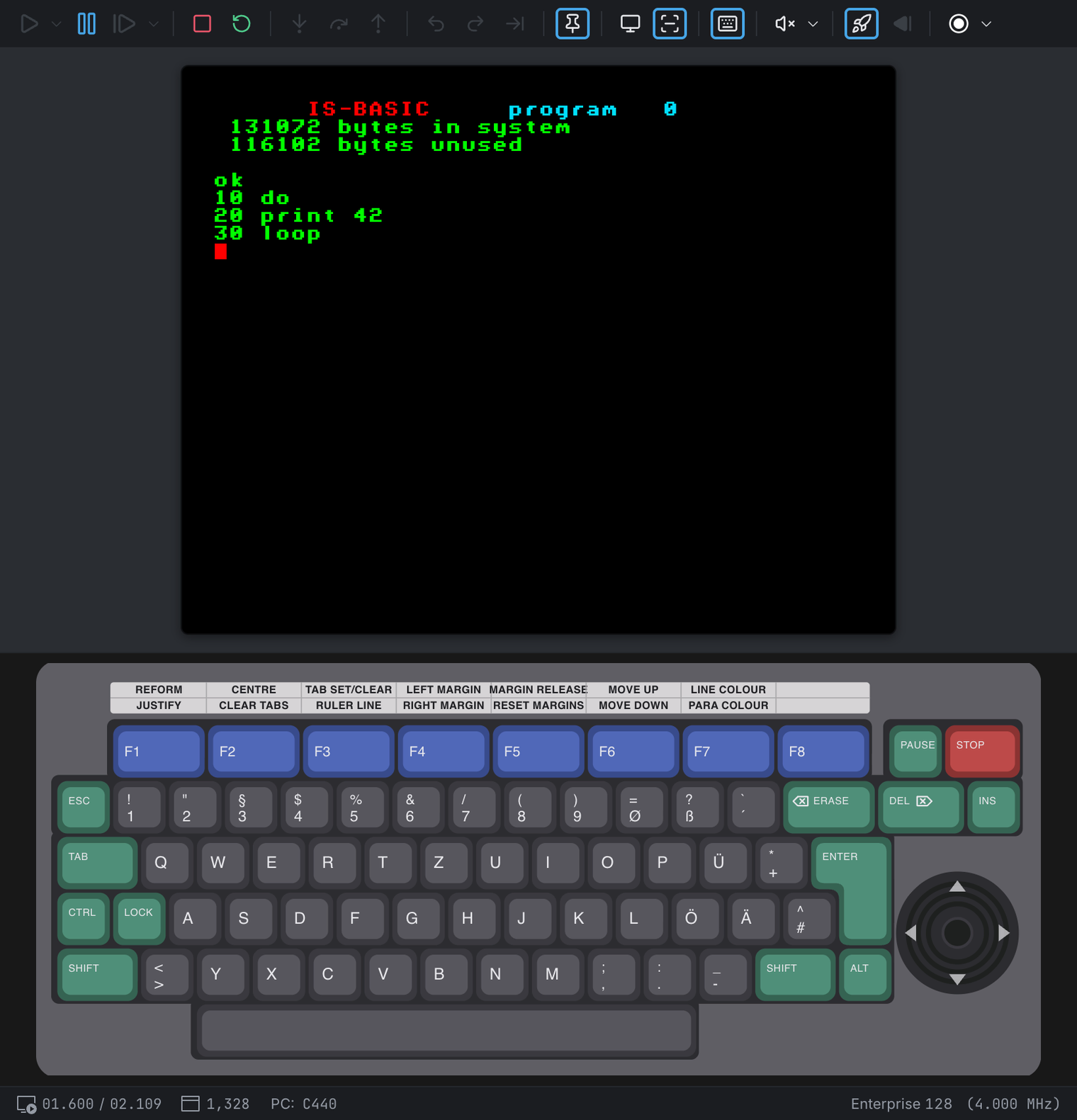
The photographed machine is a German one, and the caps print its legends: QWERTZ, the umlauts and ß. Each key is the key at that place in the machine’s keyboard matrix, and Klive runs the UK EXOS, so a key types what the UK machine types there: the cap printed Z types Y. The key printed PAUSE is the one EXOS calls HOLD.
The joystick’s four directions are the cursor keys and its knob is SPACE, the fire button of the
Enterprise’s built-in joystick. The emulator’s joystick settings drive the two external joystick
connectors; IS-BASIC’s JOY(1) reads the first one.
Files from your computer
Klive adds a device to EXOS, FILE:, that reads and writes the files of a folder on your computer.
The folder is Klive/FILEIO in your home folder; Machine › Open FILE: Folder opens it.
Use the device name wherever EXOS takes a file name:
SAVE "FILE:HELLO.BAS"
LOAD "FILE:HELLO.BAS"
LOAD "FILE:GAME.COM"
LOAD of a machine-code program (a .com file) loads it and starts it. Most Enterprise software is
kept as loose .com and .bas files: copy them into the folder and load them this way.
The device is Klive’s own: on a real Enterprise, or in another emulator, FILE: means whatever that
machine’s software makes of it. Turn it off with Machine › FILE: Device (Host Folder) to run a
program that must see the machine as it was sold.
Tapes
Enterprise tapes are .tap files, in either of the two formats the Enterprise community uses
(ep128emu’s and EPTE’s), or .wav recordings. Insert one with Machine › Tape › Insert Tape…,
the media strip under the screen, or by opening the file. Then type LOAD in IS-BASIC: the tape is
EXOS’s default device, so LOAD alone loads from it, and RUN "TAPE:" loads and runs. The
recorder’s motor follows EXOS, and Fast load (on by default) runs the machine faster while the
tape plays.
To load and start a tape in one step, use Machine › Tape › Load and Run or the tape-load -r
command: Klive boots IS-BASIC and types the command that loads and starts the tape.
SAVE writes the program as an ep128emu .tap file, which other Enterprise emulators read too (see
Where SAVE goes). ep128emu’s oldest tape files, which have no
header, are not read.
The ZX Spectrum’s tapes are .tap files too. Klive treats a .tap as the Enterprise’s while the
Enterprise is the running machine.
The EXDOS floppy card
Enterprise’s EXDOS card connects floppy drives to the machine, with the EXDOS 1.3 disk system in its ROM. Klive gives it two drives, A: and B:.
Plug in the card
Check EXDOS Floppy Interface in the Machine menu. The machine restarts with the card and its ROM;
:HELP lists “EXDOS version 1.3” among the ROMs.
Insert a disk
Insert a disk image into drive A: or B: from the Machine menu. EXDOS disks are raw .img or .dsk
images in the MS-DOS (FAT12) format with nine 512-byte sectors a track: 720K (80 tracks, two sides) is the
usual size, and 360K (40 tracks two sides, or 80 tracks one side) and 180K disks work too. Disks with 8,
10 or 18 sectors a track are refused.
Use it from IS-BASIC
With the card in, SAVE "NAME" and LOAD "NAME" read and write the disk, and :DIR lists it. A disk
with an EXDOS.INI file (EXDOS commands, one a line) runs it when the machine starts from cold; the
reset button’s warm restart does not run it.
What the machine writes goes back into the image file. A write-protected disk gives EXDOS’s “Write protected disk” message with its retry-or-abort question.
Running your own code
Create a project for the Enterprise (see Creating projects)
and press Run. Klive boots the machine, passes the banner, and at IS-BASIC’s ok types
LOAD "FILE:KLIVE.COM": EXOS loads your program through the FILE: device and starts it at 0100h,
as it starts any Enterprise program. The program is served from memory, so it never appears in your
FILE: folder. Run needs the FILE: device; with the device off, it says so.
Enterprise development explains the memory rules, the
EXOS calls, the stack your program must set, and the .com export.
Debugging
The debugger, the execution history, reverse debugging, code coverage and state files all work on the Enterprise.
- Memory. The Enterprise pages its memory in 16K segments numbered
00–FF, and the Memory and Disassembly views name each segment by that number in hex. The Memory view’s segment chooser groups them: EXOS’s ROM, the cartridge, the expansion ROMs (Klive’sFILE:device is segment10), the RAM and the video RAM (FC–FF). The 128’s RAM isF8–FF, the 64’sFC–FF. - EXOS calls. A program calls EXOS with
RST 30hfollowed by a function byte. The disassembly lists that byte with the function’s name, and Step Over steps over the call and its byte. - EXOS variables. The System Variables panel lists EXOS’s variables in its system segment, such as
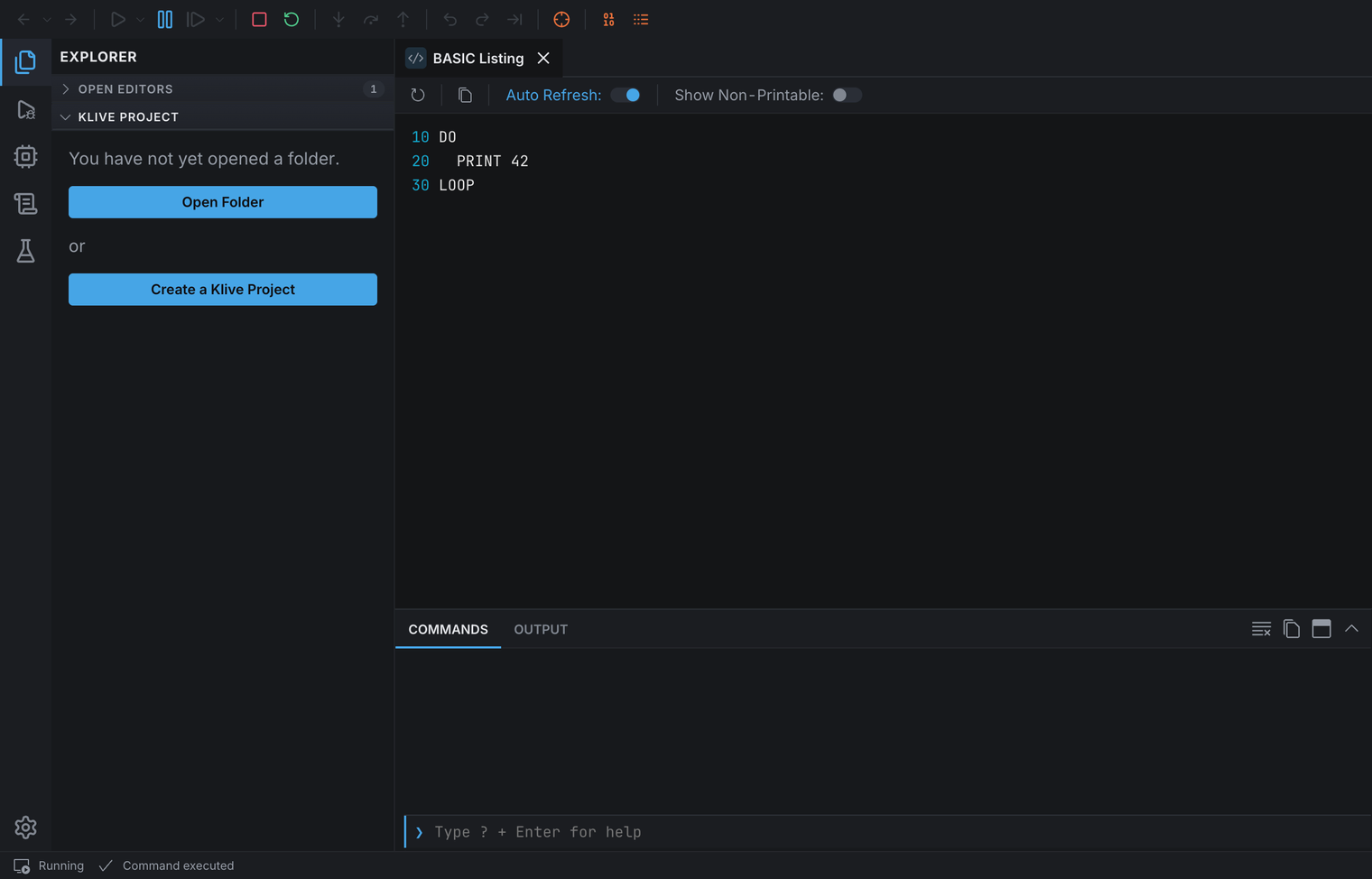
LP_POINTER, the address of the picture’s line parameter table. - The BASIC listing. The BASIC Listing view (View › Machine Views › BASIC Listing) lists the IS-BASIC program in memory, with IS-BASIC’s own indentation. It shows program 0, the one IS-BASIC starts in.
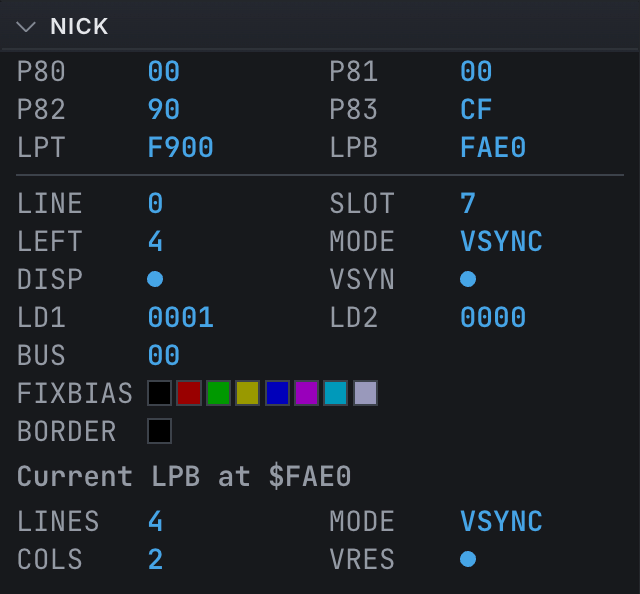
The NICK panel in the Debug activity shows the video chip: its four ports, the beam’s line and slot, the line parameter block it is showing, decoded, with its palette, and the whole line parameter table, block by block.
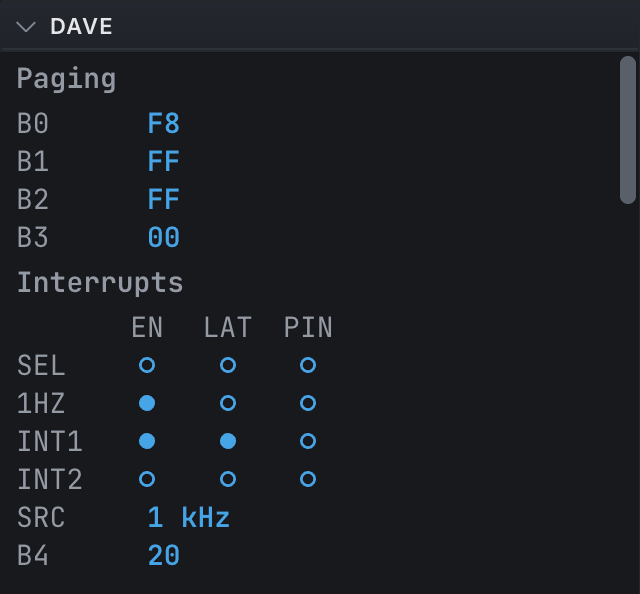
The DAVE panel shows the other chip: the four page registers with the segment each one shows, the interrupt sources with their enables, latches and inputs, the wait-state register, and each sound channel decoded (frequency, distortion, filters, ring modulation and volumes).
NICK: the picture built slot by slot explains how the video chip works.