Boriel BASIC
Klive builds ZX BASIC programs with Boriel BASIC 2 (zxbc), the compiler of the ZX BASIC
language’s author. ZX BASIC is a compiled, structured descendant of Sinclair BASIC, with subroutines,
local variables and typed variables. Klive comes with the compiler (version 2.0.0,
redistributed with its author’s permission), installs it for you, and lets you debug your program
statement by statement, with the call stack and your variables in view.
Boriel BASIC 2 is a beta. Most programs build and run, but expect rough edges, and report the ones you find. The language itself is described in Boriel BASIC’s own documentation .
Applies to: ZX Spectrum 48K, 128K, +2A/+3, +2E/+3E, Timex, Scorpion and ZX Spectrum Next.
Set up Boriel BASIC
The first time Klive starts, it offers to install Boriel BASIC in the zxbasic2 folder of your home
folder. Choose Install, pick another folder with Browse…, or choose Not now. Klive
cannot build BASIC programs until Boriel BASIC is installed.
To install it later, open Settings › Integrations and click Configure… next to Boriel BASIC. The same dialog accepts an installation you already have (Use an existing installation…), and offers Repair, Update or Reinstall when an installation is broken or older than the one that comes with Klive. Its In use row shows the installation Klive uses and whether it works. While a BASIC file is open, the status bar names the compiler; click the name to open the dialog.
Write, run and debug a program
Create a project
Create a project with the zx-basic template (File › New Project…). The template exists for
the ZX Spectrum 48K and 128K, the Timex, the Scorpion and the ZX Spectrum Next; on the +2A/+3 and
+2E/+3E, create a .zxbas file in a default project and promote it to the build root. The project’s
build root is code/program.zxbas.
Write the program
Files with the .zxbas or .bas extension are ZX BASIC source. (A .bas file that holds a
tokenised HT-1080Z program opens in the HT-1080Z tape viewer instead.)
FUNCTION Square(n AS UInteger) AS UInteger
  RETURN n * n
END FUNCTION

FOR i = 1 TO 5
  PRINT i, Square(i)
NEXT i
Run or debug it
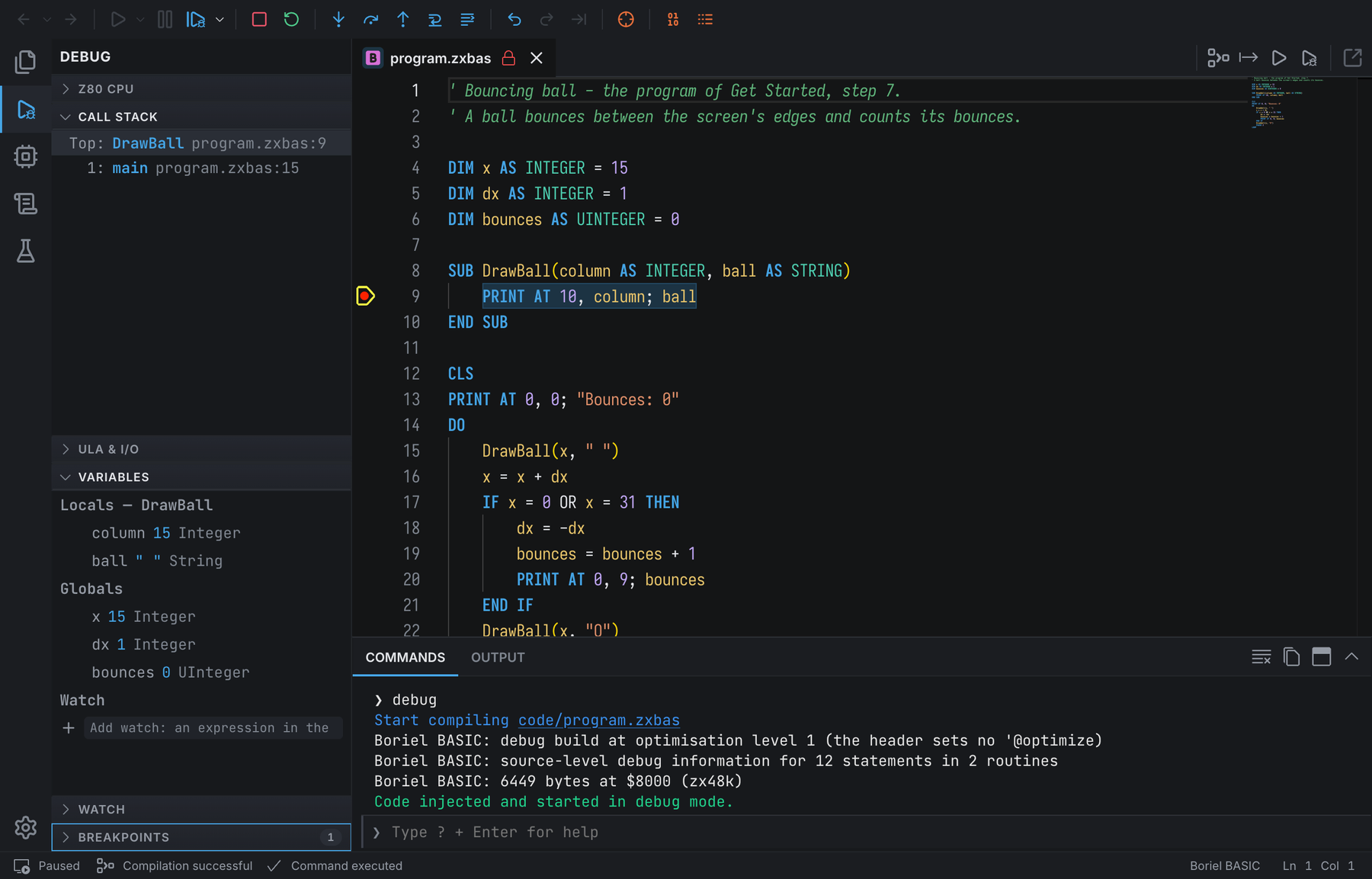
Click Inject code and start the virtual machine in the build bar to run it, or Inject code and start debugging to stop at your breakpoints. Set a breakpoint by clicking in the gutter left of a line.
The target follows the machine the project runs on: the 48K, 128K, +3 or Next. On the ZX Spectrum
Next, the program runs from the .nex file zxbc writes.
Build options in the source
Options go in the comment lines at the top of the build root file, before the first line of code,
one per line as '@name value. Klive turns them into zxbc’s command-line options:
'@optimize 0
'@heap-size 4768
'@array-base 1

PRINT "Hello"| Option | What it sets | zxbc option |
|---|---|---|
origin | The address the program starts at ($8000) | -S |
optimize | The optimisation level, 0-3 (2) | -O |
optimize-for | What the optimiser favours: size, speed or balanced | --opt-strategy |
heap-size, heap-address | The size (4768 bytes) and, optionally, the fixed address of the heap that holds strings and dynamic arrays | -H, --heap-address |
array-base, string-base | Whether arrays and strings count from 0 (the default) or 1 | --array-base, --string-base |
case-insensitive | Names match in any case | -i |
sinclair-compatible | Sinclair BASIC’s conventions: both bases 1, names in any case | -Z |
require-declarations, require-types | Every variable declared, every declaration typed | --explicit, --strict |
check-memory | Report 4 Out of memory when the heap is full | --debug-memory |
check-bounds | Report 3 Subscript wrong for an array index outside its bounds | --debug-array |
break-key | Stop with L BREAK into program when BREAK (CAPS SHIFT + SPACE) is pressed | --enable-break |
define | Preprocessor symbols, as NAME or NAME=value | -D |
include-path | Further folders searched by #include and USE | -I |
zxnext | Accept the ZX Spectrum Next’s instructions in inline assembly on any target | -N |
headerless | No start-up and no end code: the program returns to its caller | --headerless |
split-modules | Put each module into a RAM bank of its own (128K and Next, see below) | --split-modules |
nex-stack | The stack pointer a ZX Spectrum Next program starts with | --set:nex:sp |
disable-warning, enable-warning, expect-warnings | Which warnings are reported, and how many the program is expected to raise | -W, +W, --expect-warnings |
emit-asm, emit-ir, emit-map | Write the generated assembly, the intermediate code and a label map beside the source |
A few options have no effect with Boriel BASIC and produce a warning: asm-dialect (ASM blocks are
always in zxbasm’s dialect), debug-info (a build always writes full debug information),
default-byref, the codebank-* options, nex-entry, nex-loading-screen and nex-core.
#pragma lines are zxbc’s own and work as its documentation describes.
Inline assembly
ASM … END ASM blocks use the dialect of Boriel’s assembler, zxbasm: ; comments, PROC …
ENDP with LOCAL labels, $1F, 1Fh and %101 numbers, DB, DW, DS and EQU. A
routine written in assembly follows zxbc’s conventions: a FASTCALL routine gets its first argument
in A, HL or DE:HL, and a FUNCTION returns its result in A, HL, DE:HL or, for a Float, A, E, D, C, B.
Modules and banked code
Boriel BASIC 2 programs can USE modules: a MODULE name … END MODULE file in the program’s folder
(or in a folder of the include-path option), whose PUBLIC routines the program calls as
name.Routine(...).
On the ZX Spectrum 128K and the Next, add '@split-modules to the header to put each module into a
RAM bank of its own, so a program can be larger than the memory below $C000:
'@split-modules
USE tiles
USE music

tiles.Draw(3)
A call into another bank is written as any other call; the compiler pages the bank in and back out. Klive runs and debugs such a program as any other: breakpoints in a module stop only in their own bank, the call stack and Step Into, Over and Out work through the calls between banks, and a stop in a module opens its file.
- On the ZX Spectrum 128K, exporting such a program as a TAP or TZX file saves the tape
zxbcwrites, whose loader pages the banks in as the program expects; load it from 128 BASIC or the Tape Loader. Klive’s own loader options (a BASIC loader, a border, a screen) do not apply to it. - On the 48K the option has no effect, because there are no banks to use; Klive warns about it.
CODEBANK blocks (NextBuild’s way of banking code on the Next) are not Boriel BASIC syntax: a build
stops at the CODEBANK line and says so. Move the banked code into a module instead.
Debugging at source level
A debug run of a BASIC program steps statements, not Z80 instructions. On a line such as
a = 1 : b = 2 : PRINT a + b, each statement is a step, and the editor highlights only the statement
about to run.
- Step Into, Step Over and Step Out work on statements, SUB and FUNCTION calls and GOSUB subroutines; Step Over Line runs the rest of the line.
- The gutter sets a breakpoint on a line’s first statement; the small markers in front of further statements on the line set one on that statement only.
- The Call Stack panel shows the chain of routines, and the Variables panel the selected routine’s parameters and locals, the globals and your watch expressions, which can be any BASIC expression.
- When the program raises a BASIC error, the run stops at the statement that raised it.
- The toolbar’s stepping-mode button switches between source statements and Z80 instructions.
Not shown yet: a FASTCALL routine’s parameter, and the contents of an array whose bounds are not
constant. Call stack and variables describes the panels.
These commands change how source stepping behaves, and are saved as settings:
| Command | Effect |
|---|---|
em-src <on|off> [-i] | Step source statements (on) or Z80 instructions (off); -i also stops inside interrupt handlers |
em-err <on|off> | Stop where the program raises a BASIC error (on by default) |
em-jmc <on|off> | Just My Code: step over the standard library’s code (on by default) |
Exporting a ZX Spectrum Next program as a NEX file also writes <name>.nex.kbasic-debug.json beside
it. When you run that NEX with nex-run <file> -d, Klive loads the file’s debug information, so the
program steps at source level without rebuilding it.
Editing ZX BASIC
The editor colours ZX BASIC source and offers keyword help, keyword and library completion, signature help for the built-in functions, folding and block highlights. It does not know your program’s own names yet: hovers on them, Go to Definition, Find All References and Rename are not available.
Errors and warnings appear in the Build output and in the editor. They mark the whole line, because
zxbc reports no column. While you type, Klive checks the program in the background with
zxbc --parse-only, which is quick and writes no files
(Background compilation).