The Real-Time Clock
The ZX Spectrum Next has a battery-backed clock chip, a DS1307, that NextZXOS reads for the date and time on its menu and for the time stamps of the files it writes. Klive emulates the chip and keeps it like the real one: it shows the real time, and a time you set stays set when you start Klive again. Three options on the Settings dialog decide how.
Applies to: ZX Spectrum Next.
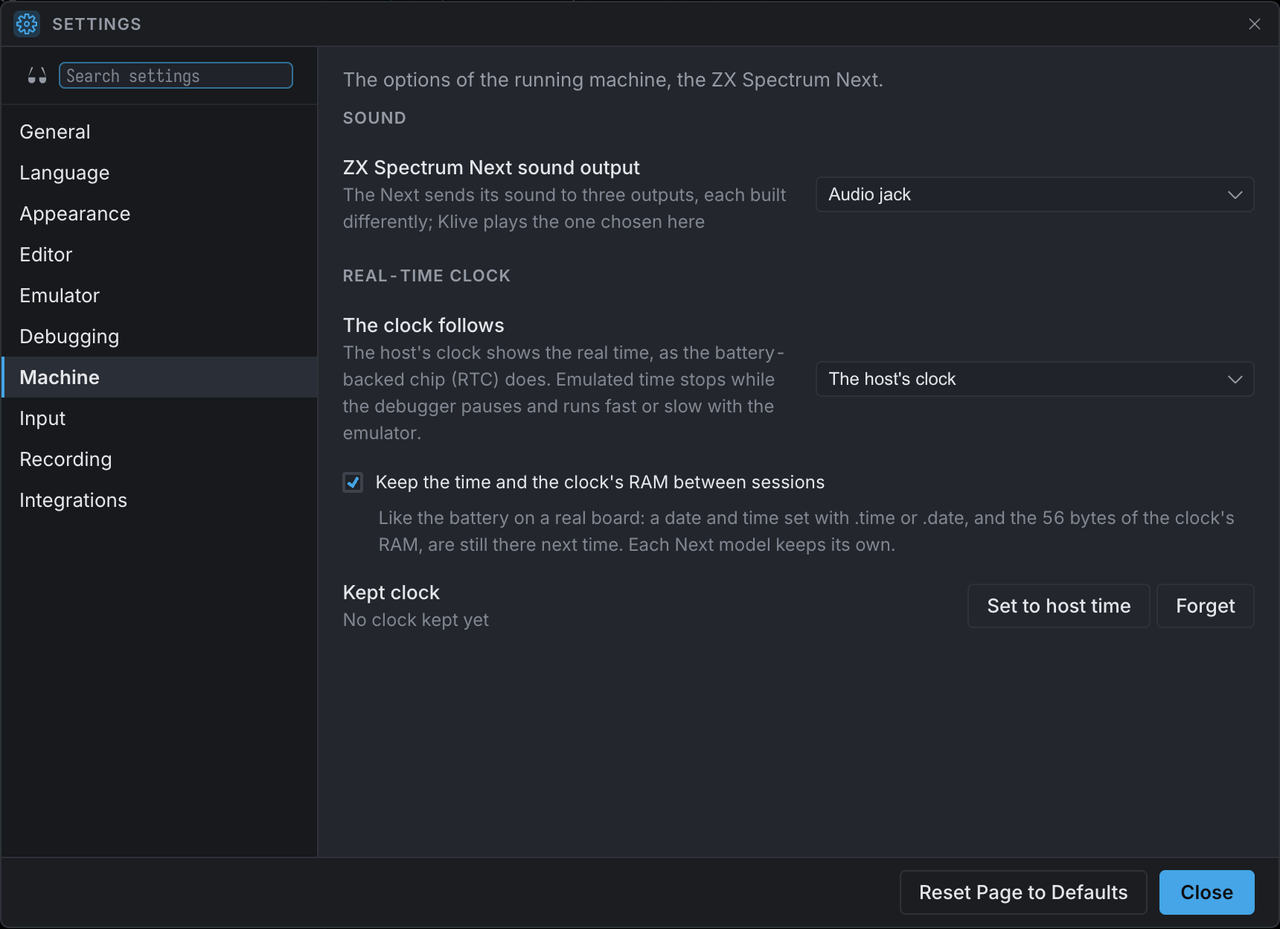
Open the clock’s options
Start a ZX Spectrum Next
The options appear only while a Next is the running machine.
Open the Machine page
Choose Machine › Configure ZX Spectrum Next…, or the Machine settings button on the emulator
toolbar. The Real-time clock group is under Sound. You can also type rtc in the dialog’s
search box.
Every change applies at once to the running machine; nothing restarts it.
What the clock follows
The clock follows has two choices:
| Choice | What the clock shows |
|---|---|
| The host’s clock (the default) | The real time, as the battery-backed chip does. A time a program sets is kept as a difference from your computer’s clock, and the clock runs on from there. |
| Emulated time | The emulated machine’s own time. It stops while the debugger pauses the machine, and runs fast or slow with the emulator. |
Use emulated time when a program’s behaviour depends on the clock and you want every run to see the same seconds, for example while you step through code that reads the time.
Switching between the two never changes the time the clock shows: it follows the new choice from the time it shows now. Set to host time brings back the real time in either mode.
Keep the clock between sessions
With Keep the time and the clock’s RAM between sessions on (the default), Klive saves the clock the way the battery on a real board keeps it:
- a date and time set with
.timeor.datein NextZXOS, or by any program; - the clock’s control register and its 56 bytes of RAM, which programs can use as a small store that survives a power cycle.
The time is kept as a difference from your computer’s clock, so it keeps running while Klive is
closed. Each Next model keeps its own clock
(ZX Spectrum Next models). The clocks are in zxnext-rtc.json in the
Klive folder of your home folder.
With the switch off, every start sets the clock to your computer’s time and clears its RAM, and nothing is saved.
The kept clock
The Kept clock row says when the running model’s clock was last saved. Its buttons:
| Button | What it does |
|---|---|
| Set to host time | Sets the clock to your computer’s time now. With keep on, it saves the clock too. |
| Forget | Deletes the model’s kept clock, clears the clock’s 56 bytes of RAM and sets it to your computer’s time. Enabled only while the model has a kept clock. |
A program that stops the clock (the CH bit of its seconds register) keeps it stopped: Klive does not move a stopped clock, and keeps it stopped between sessions.
Related
- ZX Spectrum Next models
- The Next’s SD card
- The Settings dialog
- Real-Time Clock: A Watchman on Two Wires: how the chip and its I2C bus work