The SAM Coupé
The SAM Coupé was a British home computer of 1989 from Miles Gordon Technology: a Z80B at 6 MHz, a custom ASIC with four screen modes and a palette of 128 colours, a Philips SAA 1099 for six-channel stereo sound, 3.5” disk drives and SAM BASIC in ROM. This page covers the models, starting up, the keyboard, disks and tapes, running your own machine code, and debugging.
Applies to: SAM Coupé 512K, SAM Coupé 256K
Models
Choose a model with Machine › Machine Type or Select machine… (see Choosing a machine):
| Model | RAM | ROM |
|---|---|---|
| SAM Coupé 512K (the default) | 512K | 3.0 |
| SAM Coupé 256K | 256K | 3.0 |
The ROMs ship with Klive, by permission of their author, Dr Andrew Wright. Machine types lists the model IDs.
The Machine menu has the SAM’s own switches. Each one restarts the machine:
- No Disk Drive, One Disk Drive (the default) and Two Disk Drives choose the drives fitted.
- SAM Mouse (on by default) fits the mouse interface.
- ROM 3.0 (the default) and ROM 3.1 choose the ROM. 3.1 differs only in its version number and the company name’s spelling.
Starting up
At power-on the ROM tests the memory for about three seconds, then shows its copyright screen: colour bars, the company name and the memory fitted. It waits for a key there. The first key you press only leaves the screen; SAM BASIC then shows an empty screen with its cursor at the bottom.
The keyboard, mouse and joysticks
Your keyboard maps to the SAM’s keys by position, on a UK layout. The SAM’s own keys are here:
| SAM key | Your key |
|---|---|
| DELETE | Backspace or Delete |
| EDIT | Insert |
| ESC | Escape |
| CAPS | Caps Lock |
| TAB | Tab |
| CNTRL | Control |
| SYMBOL | Alt |
| INV | Backslash |
| F1-F9 | F1-F9 |
| F0 | F10 |
| The cursor keys | The arrow keys |
SHIFT with the digit keys types ! @ # $ % & ' ( ) ~. SYMBOL types the rest of the punctuation: <
and > on the comma and full stop, [ ] on R and T, { } on F and G, ? on X, | on 9.
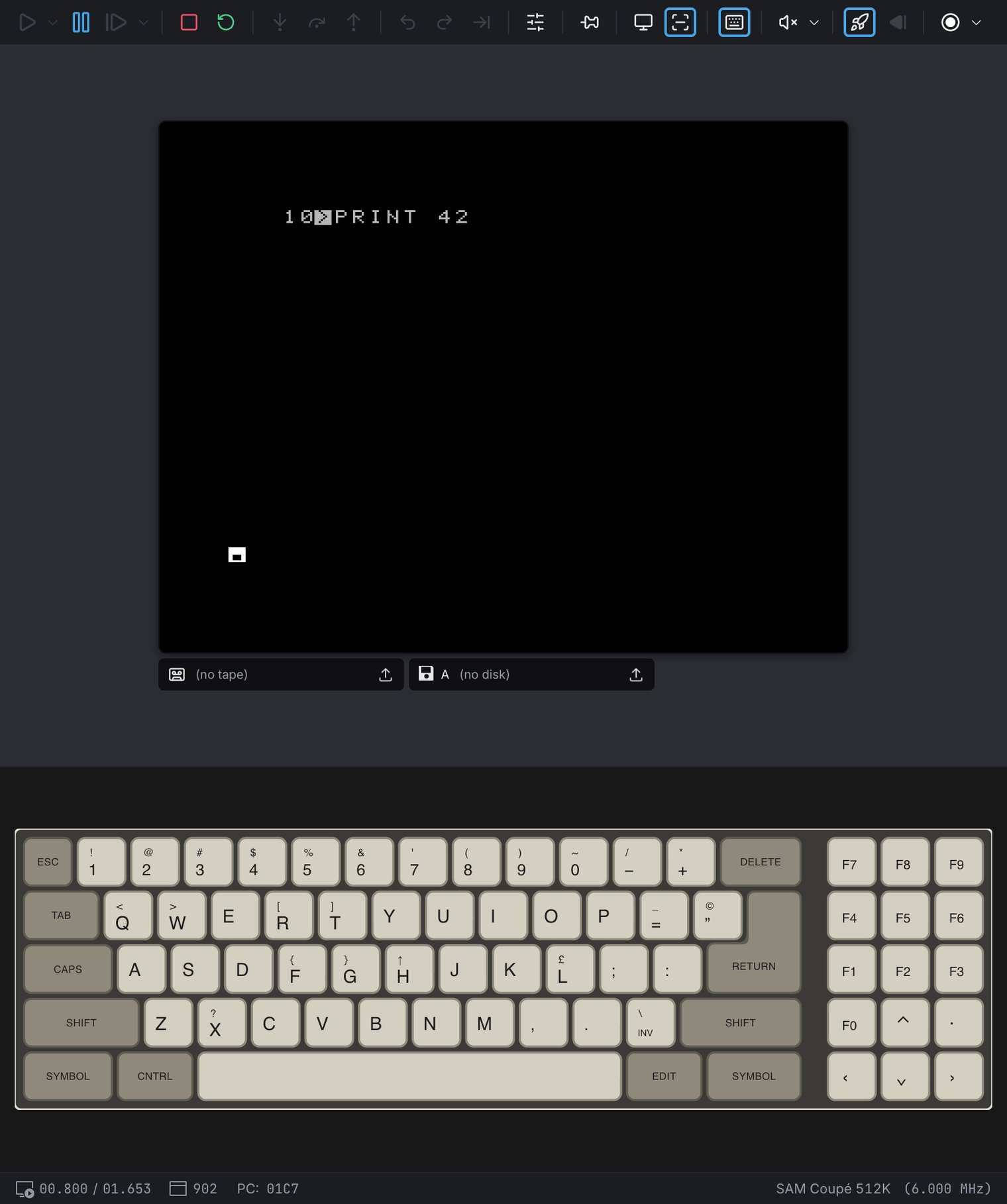
The on-screen keyboard (Show/Hide keyboard in the emulator’s toolbar) is drawn from a photograph
of a SAM Coupé. Click a key to press it, or right-click it to press it with SHIFT. Clicking the small
symbol printed at the top-left of a number or punctuation key presses SHIFT with it; clicking the small
symbol above a letter (< on Q, { on F, £ on L) presses SYMBOL with it.
The emulator’s joystick settings drive the SAM’s two joysticks, which the SAM reads as keys: the first on 6 to 0, the second on 1 to 5.
Disks
The SAM’s disks are 800K. Klive reads .mgt images and raw .dsk images (also when gzip-compressed,
as pyz80 writes them), .sad images, .dsk images in the Extended DSK format when they have the
normal format, and .sbt files, which it shows as a disk with one bootable file. Insert a disk with
Machine › Disk A or Disk B, the media strip under the screen, or by opening the file while the
SAM runs. Klive writes what the machine saves back into the image file; an .sbt file is read-only.
The ROM boots nothing by itself. Press F9 in SAM BASIC, or type BOOT, to boot the disk in the first
drive. At the copyright screen, press a key first: that key only leaves the screen.
Klive does not include a DOS. A disk boots when it carries one (SAMDOS, MasterDOS or B-DOS) or a
self-booting program. The File Manager reads and writes SAM files on .mgt images.
Tapes
SAM tapes are .tzx or .tap files. Insert one with Machine › Tape › Insert Tape…, then type
LOAD "" in SAM BASIC. The SAM has no motor control, so the tape starts by itself when the ROM starts
listening for it, and stops when the ROM stops. Fast load (on by default) runs the machine faster
while the tape plays. Machine › Tape › Load and Run boots the machine and types LOAD "" for you.
Running your own machine code
Create a project for the SAM Coupé, or put .model SAMCOUPE in your source, and use Run or
Debug. Klive boots the machine, builds a disk with a small boot loader and your program, and presses
F9: the ROM loads the boot loader, the boot loader loads your program and starts it. Export writes
the same disk as an .mgt file, which boots on a real SAM or in another emulator. See
SAM Coupé development.
Debugging
The debugger works as on the other machines: breakpoints, stepping, the memory and disassembly views,
the execution history, step back, and code coverage. The memory view shows the 32 RAM pages, the two
halves of the ROM (R0 and R1) and, with a memory pack, its external pages. The disassembly shows the
byte after RST 8 as the ROM’s error code or the DOS hook it calls, and Step Over steps past it.
The Debug activity has two SAM panels:
- ASIC shows the paging registers and what each 16K section holds, the screen mode and page, the border, the 16 palette entries as colour swatches, the line interrupt and the interrupt status, and the beam’s position with the memory contention there.
- SAA 1099 shows each sound channel’s frequency, octave, offset and volumes, the noise generators and the two envelopes.